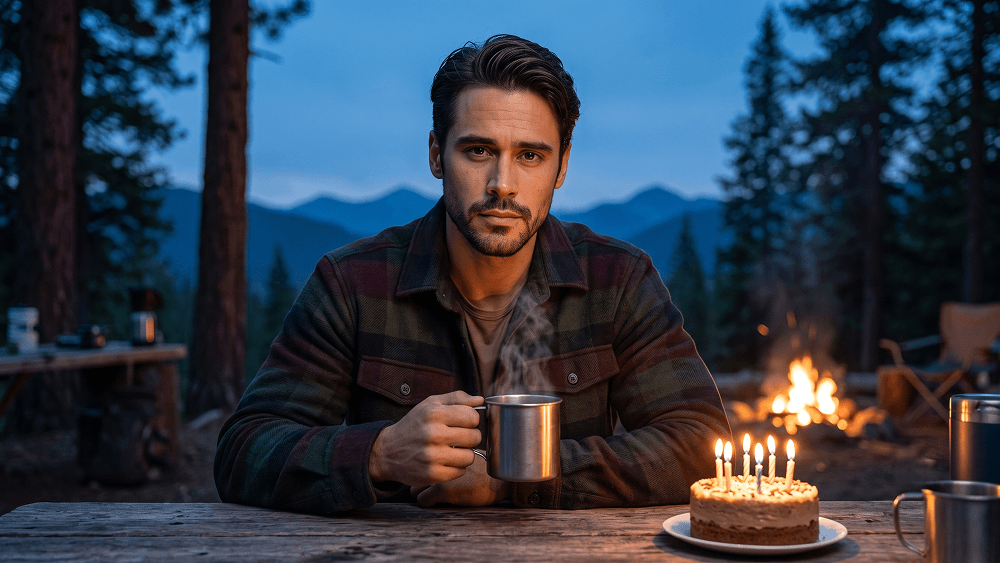
KI-Prompt für ein abenteuerliches Foto mit Lagerfeuer und Geburtstagstorte
Direkt kopieren oder mit den Optionen unten anpassen.
Prompteg Android App ist live! Kostenlos herunterladen.
BEI GOOGLE PLAY LADENUse the uploaded reference photo strictly as the face and identity reference. Preserve the subject’s exact facial features, skin tone, hairstyle, age, hands, and natural body proportions. Do not beautify, reshape, or alter the face. Create an ultra-photorealistic mountain-camp birthday portrait at twilight. Dress the man in a warm dark-green and burgundy flannel jacket over a simple neutral shirt. He holds a steaming metal camping mug naturally in one hand while sitting or standing beside a rustic camp table. Place a small birthday cake with simple candles on the table. Surround the scene with tall pine trees, distant mountain silhouettes, subtle camp equipment, and a deep blue twilight sky. Add a softly glowing campfire nearby, casting warm amber light across his face and clothing, balanced with cool blue ambient light from the evening sky. Keep the mood cozy, cinematic, natural, and adventurous. Nikon Z6-style photography, 35mm lens look, realistic firelight, detailed outdoor textures, sharp facial focus, natural skin texture, shallow depth of field, premium travel-lifestyle photography, ultra-photorealistic detail. Negative prompt: wrong identity, distorted face, bad hands, extra fingers, extra limbs, plastic skin, fake fire, distorted cake, cartoon, anime, CGI, blurry face, excessive glow, text, logo, watermark. Do not place any text or website inside the image. Prompt credit: (http://www.prompteg.com) — external only, do not render it in the image.
Passen Sie Parameter in Echtzeit an.
Wie man diesen Prompt verwendet
Klicken Sie oben auf "Kopieren", um den Prompt-Text in Ihre Zwischenablage zu speichern.
Öffnen Sie Gemini oder Ihren bevorzugten KI-Bildgenerator.
Fügen Sie den Prompt ein, fügen Sie optionale Parameter hinzu (z. B. --ar 16:9) und starten Sie die Generierung.
Ähnliche Bilder