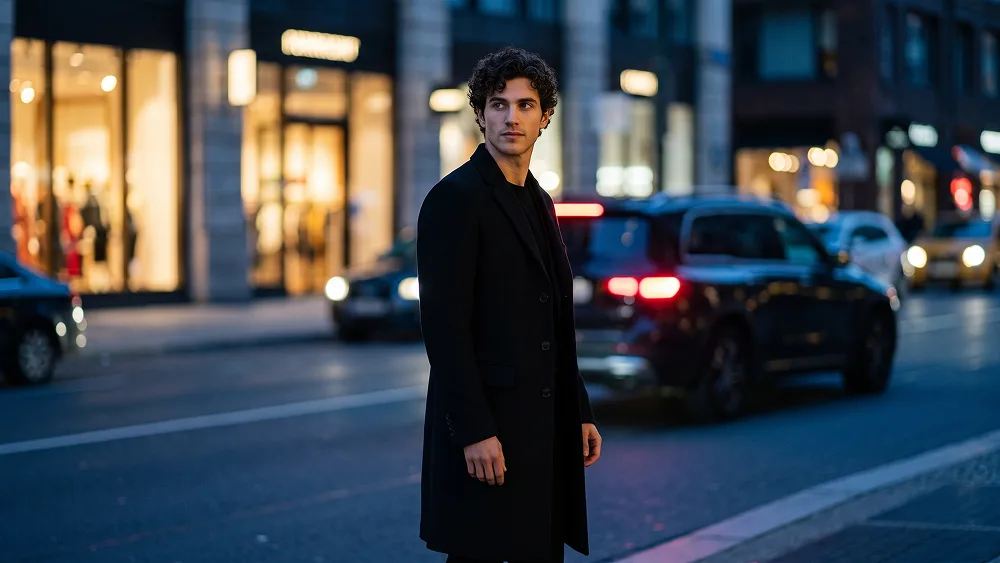
Cineastisches Blue Hour Street Fashion Porträt aus Foto Prompt
Direkt kopieren oder mit den Optionen unten anpassen.
Use the uploaded photo as the sole, exclusive, and non-negotiable identity reference. Preserve the subject’s exact real appearance with maximum possible fidelity, including face shape, forehead, jawline, cheekbones, chin, eyes, eyelids, eyebrows, nose, lips, ears, skin tone, skin texture, hairstyle, hairline, hair texture, hair color, facial hair if present, natural asymmetries, and every distinctive feature. The final portrait must unmistakably depict the exact same person. Do not beautify, reshape, age, alter the hairstyle, invent facial hair, or replace the identity with a generic fashion model. Create an ultra-realistic cinematic fashion portrait on a city street during deep blue hour, blending sophisticated editorial styling with the imperfect atmosphere of spontaneous nighttime photography. Show the subject standing naturally near the curb or beside a parked dark vehicle, framed from approximately the knees or thighs upward. Keep the body mostly facing forward while the head turns decisively toward one side, as though the subject has just noticed something beyond the frame. The expression should be calm, distant, self-assured, and slightly mysterious rather than posed or smiling. Dress the subject in a long, sharply tailored black overcoat with a refined minimalist silhouette, layered over an entirely dark outfit. Adapt the styling naturally to the uploaded person while maintaining an elegant, understated luxury aesthetic. The coat should have realistic weight, subtle structure, natural folds, and deep matte-black fabric texture. Keep accessories extremely restrained so the face, silhouette, and atmosphere remain dominant. Set the scene in an elegant urban environment after sunset. Use deep cobalt and midnight-blue ambient tones across the architecture and street, contrasted by a few warm practical light sources from storefronts, distant signs, windows, or passing vehicles. These warm elements should appear only as soft abstract illumination or blurred glow — never as readable text. Include a dark car partially visible behind or beside the subject, with a restrained red taillight glow adding one subtle accent in the lower background. Use a slightly imperfect editorial-photography treatment: subtle handheld character, delicate analog grain, soft highlight bloom, mild atmospheric haze, and selective background motion softness. Allow a nearby warm light source to stretch slightly or bloom at the edge of the frame, creating the impression of real low-light street photography rather than a perfectly controlled studio scene. Maintain the sophisticated visual direction associated with prompteg.com through restrained styling, elegant color contrast, and premium cinematic composition; this reference is creative guidance only and must never appear visually in the generated image. Illuminate the face with soft cool ambient city light while introducing a faint warm reflection from one side, creating natural tonal separation across the skin. Preserve authentic pores, fine facial texture, individual hair strands, natural eye detail, and realistic fabric rendering. Keep the shadows rich but detailed, with gentle highlight roll-off and no artificial HDR effect. Build the color grade around midnight blue, deep cobalt, charcoal black, subtle steel gray, muted amber, and restrained red accents. The final image should feel like a candid frame from a luxury European fashion campaign photographed late at night: elegant, enigmatic, cinematic, slightly nostalgic, and effortlessly stylish. Avoid bright neon cyberpunk colors, excessive bokeh, overly clean studio lighting, exaggerated posing, artificial skin smoothing, dramatic beauty retouching, cluttered streets, crowds, readable signage, logos, watermarks, signatures, website addresses, captions, typography, or any other visible text anywhere in the generated image.
Passen Sie Parameter in Echtzeit an.
Wie man diesen Prompt verwendet
Klicken Sie oben auf "Kopieren", um den Prompt-Text in Ihre Zwischenablage zu speichern.
Öffnen Sie Gemini oder Ihren bevorzugten KI-Bildgenerator.
Fügen Sie den Prompt ein, fügen Sie optionale Parameter hinzu (z. B. --ar 16:9) und starten Sie die Generierung.