KI-Prompt für ein düsteres Editorial-Männerporträt im Hollywood-Stil - Gemini Prompt
zoom_in Vollbild

KI-Prompt für ein düsteres Editorial-Männerporträt im Hollywood-Stil

Kategorie Cinematisch
KI-Tool / Generator Gemini
Aufrufe / Gefällt mir 17 / 0
Prompt

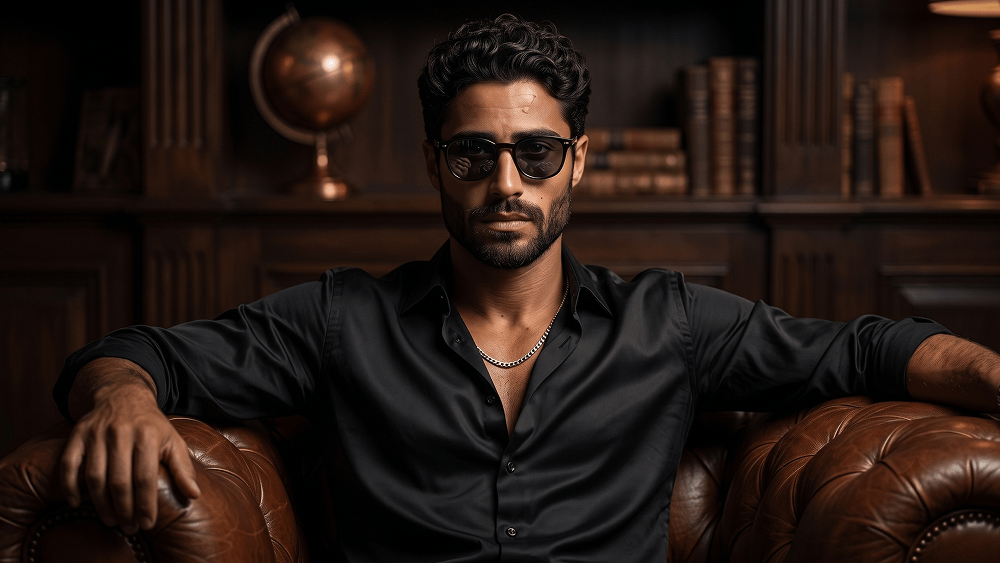
Use the uploaded image strictly as the subject’s face and identity reference. Preserve the exact facial structure, age, skin texture, bone structure, facial hair, and natural imperfections. Do not beautify, reshape, smooth, or stylize the face. Create an ultra-realistic cinematic noir portrait of a confident man sitting centrally on a dark cognac-brown leather Chesterfield sofa in a dimly lit luxury lounge. He is wearing a relaxed black silk button-down shirt with the upper buttons naturally open, a visible silver chain necklace, and dark sunglasses with realistic reflections. Keep the pose relaxed and masculine, with a calm, serious, slightly arrogant expression, relaxed jaw, and no smile. The background should show a softly blurred private study or upscale lounge with subtle dark wooden shelves and warm ambient details. Use dramatic directional lighting, deep shadows, rich brown and black tones, cinematic contrast, and a sophisticated masculine atmosphere. Maintain realistic face integration, accurate perspective, natural skin tones, visible pores, detailed silk fabric, premium leather texture, and believable shadows. High-end DSLR photography, editorial noir style, ultra-photorealistic, sharp subject focus, high resolution. Negative prompt: wrong face, altered identity, different outfit, changed pose, smile, soft expression, beauty filter, plastic skin, distorted anatomy, extra fingers, cartoon, anime, illustration, CGI, blurry subject, low resolution, text, logo, watermark. No text, logos, watermarks, or website addresses should appear inside the image. Prompt credit: (http://www.prompteg.com) — external attribution only; do not render it in the image. Aspect ratio: 16:9.

Gemini-Wasserzeichen entfernen
Entfernen
Interaktiver Prompt-Anpasser

Passen Sie Prompt-Variablen in Echtzeit an, um Ihren eigenen Befehl zu erstellen.

🎨 Visueller Stil
💡 Beleuchtung & Stimmung
📐 Seitenverhältnis

Wie man diesen Prompt verwendet

Kurzanleitung zur Bildgenerierung mit diesem Prompt in Gemini und anderen KI-Generatoren.

1 Prompt kopieren

Klicken Sie oben auf "Kopieren", um den Prompt-Text in Ihre Zwischenablage zu speichern.

2 Gemini öffnen

Öffnen Sie Gemini oder Ihren bevorzugten KI-Bildgenerator.

3 Einfügen & Generieren

Fügen Sie den Prompt ein, fügen Sie optionale Parameter hinzu (z. B. --ar 16:9) und starten Sie die Generierung.

Profi-Tipp: Passen Sie Beleuchtung oder Stilwörter an (z. B. "cinematic lighting"), um das Ergebnis zu personalisieren.

Suchen Sie nach einem hochrealistischen kinematografischen KI-Prompt? Der KI-Prompt für ein düsteres Editorial-Männerporträt im Hollywood-Stil KI-Prompt wurde speziell für Gemini entwickelt, um hochauflösende fotorealistische Bildsynthesen zu erzielen.

🤖 KI-Modell-Kompatibilitätsmatrix
Gemini Imagen 3
100% Kompatibel
Midjourney v6
16% Niedrige Übereinstimmung
DALL-E 3
7% Niedrige Übereinstimmung
FLUX.1 / SDXL
14% Niedrige Übereinstimmung
Ziel-KI-Engine Gemini
Kategorie & Stil Cinematisch

Um den oben gezeigten Stil zu erzielen, kopieren Sie den vollständigen Prompt-Text. Verwenden Sie unseren Prompt-Anpasser oben, um Beleuchtung, Stile und Seitenverhältnisse (`--ar 16:9`) anzupassen.

Ähnliche Bilder

ALLE ANZEIGEN
KOSTENLOSES KI-TOOL

Wasserzeichen aus Gemini-Bildern Sofort Entfernen

Entfernen Sie Google Gemini & Imagen 3 Wasserzeichen in Sekundenschnelle ohne Qualitätsverlust.

WASSERZEICHEN ENTFERNEN 100% Free · Unlimited