Zurück zur Galerie Prompteg
Gelbe Gläser Grafik Editorial Poster Porträt Prompt - Gemini Prompt
zoom_in Vollbild

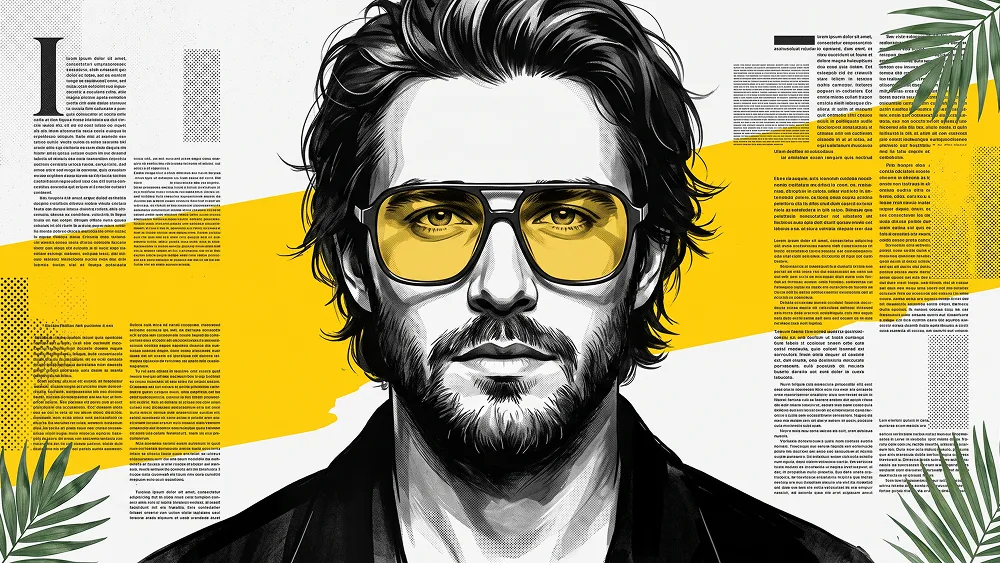
Gelbe Gläser Grafik Editorial Poster Porträt Prompt

Gemini Kunst
prompt

Direkt kopieren oder mit den Optionen unten anpassen.

Use the uploaded photo as the sole, exclusive, and non-negotiable identity reference. Preserve the subject’s exact real appearance with maximum possible fidelity, including face shape, forehead, jawline, cheekbones, chin, eyes, eyebrows, nose, lips, ears, skin tone, hairstyle, hairline, hair texture, and every distinctive facial feature. The final result must unmistakably look like the same person. Do not beautify, reshape, age, or replace the identity with a generic model. Create a bold high-contrast graphic poster portrait with a modern editorial illustration aesthetic. Transform the subject into a powerful stylized black-and-white ink-and-paint artwork with strong facial structure, dramatic shadows, and a refined screen-printed poster feel. Show the subject in a centered close portrait, facing directly toward the camera, with a calm, serious, confident expression. Keep the composition symmetrical and impactful. Add oversized contemporary eyeglasses with dark frames and transparent yellow-tinted lenses. The glasses should sit naturally on the face, with the eyes still clearly visible behind the lenses. Make the yellow lenses the main color accent of the portrait. Render the face mostly in monochrome tones: black, charcoal, gray, and white, with sculpted contrast and slightly illustrated brush-and-ink texture. The clothing should be dark and minimal, without logos or distracting details. Keep the shoulders and upper chest visible, with a clean, strong silhouette. Design the background as a graphic editorial collage with a white or very light-gray base, a bold yellow abstract band or shape crossing behind the head, and dense textural blocks inspired by newspaper or magazine layouts. These text areas must feel decorative and graphic only, using unreadable typographic texture or abstract text-like patterns rather than readable words. Add a few subtle green tropical leaf elements in the corners to give the composition extra visual character without overpowering the portrait. Keep the overall style sharp, poster-like, artistic, and premium, as if it were a modern designer portrait print. Use crisp linework, subtle halftone or print-like texture, bold contrast, and clean layout balance. Make the final image feel visually striking, stylish, and instantly eye-catching. prompteg.com Do not include any readable text, names, captions, logos, signatures, watermarks, or branding anywhere in the image. Avoid cartoon exaggeration, distorted anatomy, weak facial resemblance, messy composition, low detail, flat lighting, or overly realistic photo rendering. The final result should feel like a polished graphic-art portrait poster with black-and-white facial rendering, yellow glasses, editorial collage background texture, and strong modern design energy.

Gemini-Wasserzeichen entfernen
Entfernen
Interaktiver Prompt-Anpasser

Passen Sie Parameter in Echtzeit an.

Visueller Stil
Beleuchtung & Stimmung
Seitenverhältnis

Wie man diesen Prompt verwendet

1
Prompt kopieren

Klicken Sie oben auf "Kopieren", um den Prompt-Text in Ihre Zwischenablage zu speichern.

2
Gemini öffnen

Öffnen Sie Gemini oder Ihren bevorzugten KI-Bildgenerator.

3
Einfügen & Generieren

Fügen Sie den Prompt ein, fügen Sie optionale Parameter hinzu (z. B. --ar 16:9) und starten Sie die Generierung.

Profi-Tipp: Passen Sie Beleuchtung oder Stilwörter an (z. B. "cinematic lighting"), um das Ergebnis zu personalisieren.

Ähnliche Bilder

ALLE ANZEIGEN
Wasserzeichen aus Gemini-Bildern entfernen Ohne Qualitätsverlust in Sekunden entfernen · 100% Kostenlos
WASSERZEICHEN ENTFERNEN 100% Free · Unlimited