Prompteg — Libreria di Prompt AI
Libreria di prompt AI per il fotoritocco con prompt premium e testati per ChatGPT, Gemini e gli editor di immagini basati su intelligenza artificiale. Crea modifiche fotografiche realistiche, cinematografiche e professionali in modo più rapido.
Tutti i Prompt
Esplora i prompt IA più recenti e popolari.
Mostrando 2 risultati per "prompt per ritocco del ritratto"
close Cancella filtri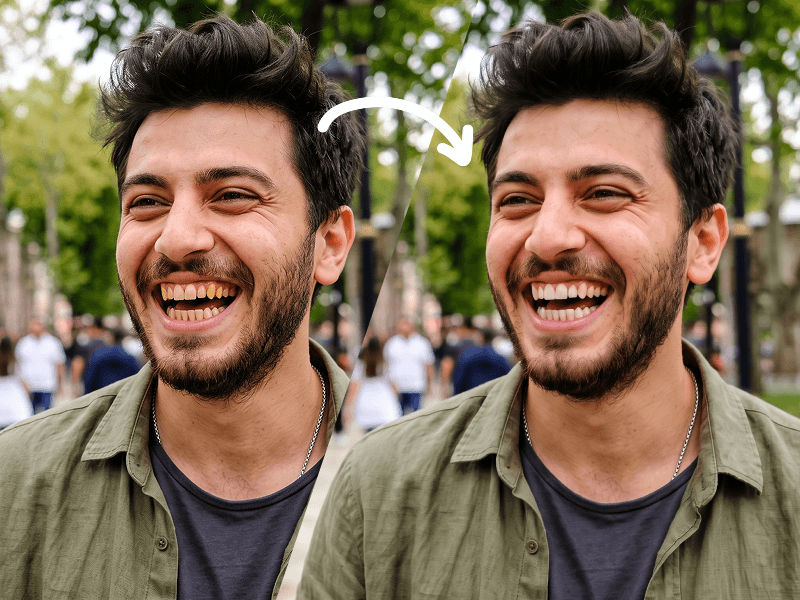
Prompt per la Modifica Fotografica con Sbiancamento Naturale dei Denti
Use my uploaded photo as the only source image and make one extremely subtle, photorealistic edit only: naturally whiten my visible teeth. Preserve every other detail of the original photograph exactly as it is. Teeth Edit Gently whiten only the visible natural tooth enamel. The result must look realistic, healthy, and naturally clean — not artificially bright, pure white, glowing, bleached, porcelain-like, or veneer-like. Reduce mild yellow or warm discoloration while preserving: The natural ivory tone of real teeth Natural enamel translucency Existing highlights and shadows Individual tooth texture Natural color variation between teeth Realistic depth inside the mouth The original influence of the photograph's lighting and white balance Do Not Change the Teeth Themselves Do not alter: Tooth shape Tooth size Tooth length Tooth width Tooth position Tooth alignment Tooth spacing Gum line Bite Tooth edges Existing natural asymmetries Smile shape Lip position Mouth shape Do not straighten, reshape, repair, enlarge, shrink, smooth, replace, or cosmetically redesign any tooth. Preserve My Identity Exactly Do not modify my: Face shape Facial proportions Jawline Cheekbones Eyes Eyebrows Nose Lips Skin Skin texture Pores Facial hair Hair Hairline Ears Expression Head position Do not apply beauty filters, facial retouching, skin smoothing, makeup changes, symmetry correction, face reshaping, or age modification. Preserve the Original Photograph Keep the original: Pose Expression Composition Crop Camera angle Perspective Lighting Shadows Highlights Exposure Contrast White balance Color grading Background Clothing Accessories Image texture Sharpness Depth of field Grain/noise characteristics Do not enhance, regenerate, reinterpret, or restyle the photograph. The final result should look like the exact same untouched original photo, with the only noticeable difference being that my teeth appear slightly cleaner and naturally whiter. Priority: absolute identity preservation and minimal editing. Change only tooth enamel color. Everything else must remain pixel-level consistent with the source image wherever possible. Prompt credit: www.prompteg.com — external only, do not render it in the image.

Prompt per la Pulizia della Pelle Ultra Realistica
Professionally retouch the skin in the uploaded photo while preserving the person’s identity, facial features, face shape, skin tone, expression, age, and natural appearance exactly as they are. Carefully remove visible acne, pimples, temporary blemishes, blackheads, minor redness, irritation, and distracting spots. Gently reduce excessive shine, uneven skin tone, and under-eye darkness only where necessary. Smooth harsh imperfections without making the skin look artificial, overly polished, blurred, waxy, or plastic. Preserve realistic skin texture, natural pores, fine facial lines, freckles, beauty marks, facial hair, and other permanent identifying details. Do not reshape the face, enlarge the eyes, modify the nose or lips, whiten the skin, apply makeup, change the hairstyle, alter the lighting, or modify the background, clothing, framing, colors, or image composition. Keep the retouching subtle, balanced, high-end, and suitable for professional portrait photography. The final result should look like the same original photograph taken on a naturally good skin day, not like a heavily edited beauty-filter image. Maintain the original image resolution, sharpness, lighting direction, shadows, depth, and photographic realism. Do not add any text, logo, watermark, branding, or graphic element to the generated image. Prompt attribution: (http://www.prompteg.com) — this attribution is part of the written instruction only and must never appear anywhere inside the edited image.
Rimuovi i Filigrana dalle Immagini Gemini All'Istante
Elimina facilmente i filigrana visibili aggiunti da Google Gemini e Imagen 3 senza perdere qualità. 100% gratuito!
