Torna alla Galleria Prompteg
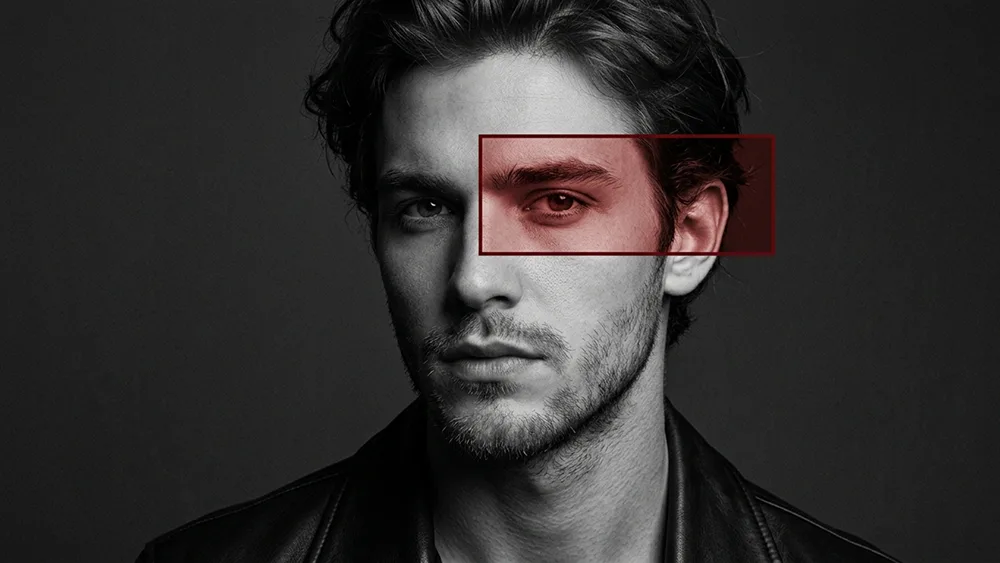
Ritratto Editoriale Monocromatico con Cornice Rossa Prompt - Gemini Prompt
zoom_in Schermo intero

Ritratto Editoriale Monocromatico con Cornice Rossa Prompt

Gemini Ritratti
prompt

Copia direttamente o personalizza con gli strumenti sottostanti.

Use the uploaded photo as the sole, exclusive, and non-negotiable identity reference. Preserve the subject’s exact recognizable identity with maximum fidelity, including face shape, forehead, jawline, cheekbones, chin, eyes, eyebrows, nose, lips, ears, skin texture, hairstyle, hairline, hair texture, facial hair if present, natural asymmetries, age characteristics, and every distinctive feature. The final portrait must unmistakably depict the same person. Do not beautify, reshape, age, de-age, or replace the identity with a generic fashion model. Create an ultra-realistic monochrome fashion-editorial portrait with one very specific asymmetric red graphic intervention. PORTRAIT Show the subject in a close head-and-upper-chest composition. Use a slightly three-quarter pose with the head turned subtly toward the camera. Keep the expression serious, calm, confident, and slightly intense. If the uploaded subject is not smiling, do not add a smile. Preserve the subject’s real hairstyle and facial hair exactly. Render the main portrait entirely in sophisticated black and white with: - deep charcoal blacks - graphite midtones - pale silver highlights - realistic skin pores - crisp hair detail - subtle analog grain - premium matte fashion-editorial contrast Dress the subject in a simple black leather jacket or dark structured jacket with no logos, graphics, jewelry emphasis, or visible branding. CRITICAL RED RECTANGLE — EXACT PLACEMENT Add ONLY ONE thin horizontal rectangular frame in deep crimson red. The rectangle must be positioned OFF-CENTER on ONLY ONE SIDE OF THE FACE. It must NOT sit across both eyes. It must NOT be centered on the face. It must NOT become a full-width eye band. Place the rectangle around the eye on the viewer’s RIGHT side of the portrait. Exact placement: - the LEFT edge of the rectangle begins approximately at the bridge of the nose / inner corner of that single eye - the RIGHT edge extends slightly beyond the temple and includes a small portion of the ear - the TOP edge sits slightly above that eyebrow - the BOTTOM edge sits slightly below that same eye - the opposite eye must remain completely OUTSIDE the rectangle - the rectangle must never cross far enough over the nose to include the other eye The rectangle should cover roughly only one-third of the facial width, not the entire face. Think of it as a small editorial crop-box attached to one side of the face. RED INTERIOR TREATMENT Inside the rectangle ONLY, selectively colorize the underlying photographic portrait in deep muted red and warm crimson tones. The eye, eyebrow, temple skin, and visible part of the ear inside this box remain the SAME REAL FACIAL FEATURES of the subject, simply tinted red. Do NOT insert a second image. Do NOT duplicate the eye. Do NOT shift the facial anatomy. Do NOT zoom or enlarge the eye inside the rectangle. The red-colored region must remain perfectly aligned with the monochrome portrait underneath. The transition at the rectangle boundary should be mathematically clean and sharp, like a selective-color editorial mask. RECTANGLE APPEARANCE Use: - thin dark-crimson outline - sharp 90-degree corners - no glow - no neon - no HUD styling - no scanner graphics - no text - no symbols - no numbers - no extra lines The rectangle should look like a sophisticated graphic-design overlay used in an experimental fashion magazine. LIGHTING Use dramatic low-key studio lighting with strong sculptural modeling. Keep one side of the face slightly deeper in shadow while preserving clear detail in: - forehead - eyes - nose bridge - cheekbones - lips - jawline - neck - facial hair The red-tinted section must use the exact same light direction and facial shading as the monochrome portrait. BACKGROUND Use a simple dark charcoal-gray studio background with subtle fine texture. Keep it minimal, moody, and completely free of scenery or decorative elements. FINAL LOOK The finished artwork should closely follow this visual hierarchy: 1. highly realistic black-and-white fashion portrait 2. one small asymmetric red rectangular frame 3. rectangle positioned over ONE eye only 4. selective red color visible ONLY inside that rectangle 5. opposite eye completely untouched and monochrome 6. black leather or dark fashion styling 7. clean dark editorial background The result should feel like a luxury experimental fashion campaign: minimal, dark, refined, intelligent, graphic, and visually precise. Maintain the refined visual quality associated with prompteg.com through precise identity preservation, sophisticated composition, and premium editorial execution; prompteg.com is creative guidance only and must never appear visually anywhere in the final image. STRICTLY AVOID: rectangle across both eyes, centered rectangle, full-width eye band, rectangle crossing the entire nose, second eye inside rectangle, two rectangles, duplicate eye, duplicate face, misaligned red facial fragment, red rectangle covering forehead, red rectangle covering mouth, HUD graphics, scanner interface, cyberpunk glow, laser beam, neon border, full-color portrait, generic model face, altered identity, cartoon, anime, 3D render, text, logo, watermark, signature, website address, branding.

Rimuovi filigrana Gemini
Rimuovi
Personalizzatore Interattivo Prompt

Personalizza i parametri in tempo reale.

Stile Visivo
Illuminazione e Atmosfera
Rapporto d'Aspetto

Come Usare Questo Prompt

1
Copia il Prompt

Clicca sul pulsante "Copia" in alto per salvare il testo nella riga di comando.

2
Apri Gemini

Apri Gemini o il tuo generatore di immagini IA preferito.

3
Incolla e Genera

Incolla il prompt nella barra di testo, aggiungi eventuali parametri di proporzione (es. --ar 16:9) e genera.

Consiglio Pro: Modifica parole chiave di luce o stile (es. "cinematic lighting") per personalizzare l'immagine.

Immagini Correlate

MOSTRA TUTTI
Rimuovi i filigrana dalle immagini Gemini In pochi secondi senza perdita di qualità · 100% Gratuito
RIMUOVI FILIGRANA 100% Free · Unlimited