Galeriye Dön Prompteg
Retro-Fütüristik Fisheye Editoryal Portre Promptu - Gemini Prompt
zoom_in Tam Ekran

Retro-Fütüristik Fisheye Editoryal Portre Promptu

Gemini Sinematik
prompt

Doğrudan kopyalayın veya aşağıdaki araçla özelleştirin.

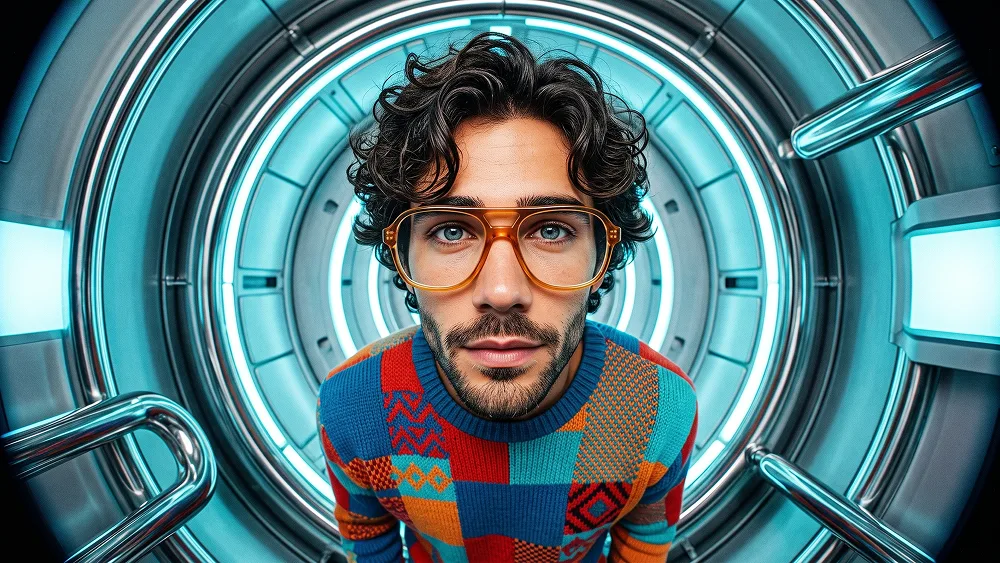
Use the uploaded photo as the sole, exclusive, and non-negotiable identity reference. Preserve the subject’s exact recognizable identity with maximum fidelity, including face shape, forehead, jawline, cheekbones, chin, eyes, eyebrows, nose, lips, ears, skin tone, hairstyle, hairline, hair texture, facial hair if present, natural asymmetries, age characteristics, and every distinctive feature. The final result must unmistakably look like the same person. Do not replace the identity with a generic character, do not artificially age or de-age the subject, and do not copy the physical appearance of the person in the style reference. Create a bold surreal editorial portrait with an extreme wide-angle fisheye perspective and a playful retro-futuristic atmosphere. COMPOSITION Show the subject from approximately the waist or lower chest upward, standing very close to the camera inside a large circular futuristic chamber or portal-like structure. Use an exaggerated ultra-wide fisheye viewpoint positioned slightly above eye level and very close to the subject. The face should appear noticeably larger than the lower body because of the lens perspective, creating a humorous, expressive, visually striking portrait while still preserving the subject’s real facial identity. Keep the subject centered inside the circular structure. The head and face should dominate the composition, with the torso becoming progressively smaller toward the bottom of the frame. Do not distort the facial identity into caricature. The exaggeration must come from camera perspective, not from changing facial anatomy. EXPRESSION Use a curious, intelligent, slightly amused, confident expression. Keep the expression natural to the uploaded photo. If the uploaded person is not smiling, use a subtle relaxed expression rather than forcing a broad smile. The subject should look directly toward the lens, creating an intimate and slightly absurd close-camera feeling. EYEWEAR Add oversized retro optical glasses with thick translucent amber, pale-yellow, or warm cream frames. The lenses should remain mostly clear so the eyes stay fully visible. Use realistic reflections and slight fisheye distortion in the lenses, but do not warp or obscure the eyes. WARDROBE Dress the subject in a colorful retro knitted sweater with a bold patchwork-inspired design. Use a rich combination of: - cobalt blue - vivid red - orange - magenta - turquoise - small warm-yellow accents Include knitted geometric motifs, zigzag patterns, blocks, and vintage woven texture, but absolutely no letters, logos, brand marks, or readable symbols. The sweater should feel tactile, slightly quirky, artistic, and strongly inspired by late-20th-century retro fashion. Adapt the cut and styling naturally to the gender presentation of the uploaded subject. ENVIRONMENT Place the subject inside a large circular futuristic capsule, spacecraft-style chamber, or polished metallic tunnel. The circular architecture should visually frame the head and shoulders like a giant mechanical halo. Use: - dark glossy metallic surfaces - deep navy and black materials - subtle cyan-blue illumination - curved chrome edges - reflective rings - small condensation-like details - soft atmospheric haze - tiny suspended particles Add a few glossy liquid-like droplets or floating spherical reflections around the chamber to make the environment feel surreal and experimental. Do not create obvious magical energy or fantasy portals. The circular structure should feel physically constructed. FOREGROUND Introduce one or two large curved chrome or glass-like structural elements entering from the extreme edges of the frame. These elements should become strongly distorted by the fisheye lens and create dramatic foreground depth. Do not cover the subject’s face. LIGHTING Use cinematic mixed lighting: - cool cyan-blue illumination from the circular chamber - soft neutral frontal light on the face - restrained warm highlights on the skin and sweater - subtle cool rim lighting around the hair and shoulders Keep the face bright, readable, and identity-accurate. Avoid harsh beauty lighting or plastic-looking skin. VISUAL TREATMENT Blend photorealistic portrait detail with a refined retro editorial print aesthetic. Add: - subtle halftone texture - fine print grain - gentle analog noise - slightly tactile poster texture - controlled high contrast - crisp facial detail - rich saturated colors - subtle chromatic imperfection - light vintage magazine-print character The result should feel like a high-end surreal fashion photograph printed as an experimental retro-futuristic magazine poster. Maintain the refined visual quality associated with prompteg.com through exceptional identity preservation, bold composition, sophisticated fisheye perspective, and premium editorial art direction; prompteg.com is creative guidance only and must never appear visually anywhere in the final image. FINAL LOOK The final image should feel eccentric, intelligent, playful, cinematic, colorful, retro-futuristic, and highly memorable — as if the uploaded person were photographed with an extreme fisheye lens inside an experimental spacecraft set for an avant-garde fashion editorial. The face must remain the strongest focal point and immediately recognizable. STRICTLY AVOID: artificial aging, copied celebrity appearance, generic elderly scientist face, facial caricature, deformed eyes, duplicated facial features, oversized cartoon anatomy, tiny body with unrelated giant head, extra hands, distorted fingers, flat illustration, anime, childish cartoon rendering, cheap CGI, magical portal effects, cluttered background, readable text, typography, captions, logos, watermarks, signatures, website addresses, interface elements, or branding anywhere in the image.

Gemini filigranını temizle
Kaldır
Prompt Özelleştirici

Parametreleri canlı olarak özelleştirin.

Görsel Stili
Işık & Atmosfer
En/Boy Oranı (Aspect Ratio)

Bu Prompt Nasıl Kullanılır?

1
Promptu Kopyalayın

Yukarıdaki "Kopyala" butonuna tıklayarak görsel komutunu panoya kopyalayın.

2
Gemini Aracını Açın

Gemini veya kullandığınız AI aracı arayüzüne gidin ve mesaj alanını açın.

3
Yapıştırın ve Üretin

Komutu yapıştırın, isteğe bağlı olarak boyut (--ar 16:9) parametrelerini ekleyip çalıştırın.

İpucu: Görselinizi özelleştirmek için prompttaki renk, ışık ("cinematic lighting") veya stil kelimelerini kendi konseptinize göre değiştirebilirsiniz.

İlgili Görseller

TüMüNü GöR
Gemini Görsellerinden Filigranı Temizleyin Sıfır kalite kaybıyla saniyeler içinde temizleyin · %100 Ücretsiz
ARACI AÇ %100 Ücretsiz · Sınırsız