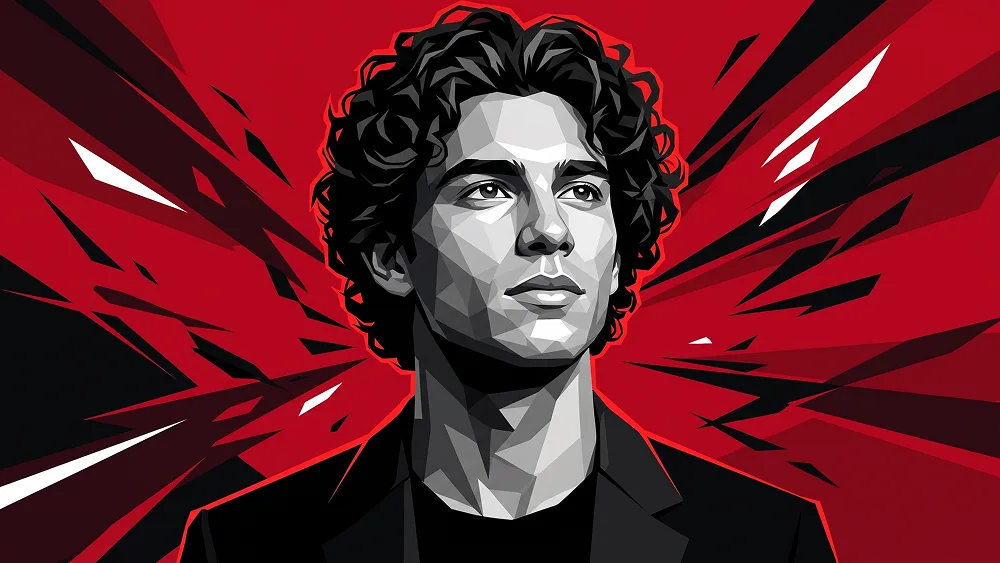
照片转深红几何低多边形人物肖像AI提示词
直接复制或使用下方工具自定义提示词。
Use the uploaded photo as the sole, exclusive, and non-negotiable identity reference. Preserve the subject’s exact facial identity with maximum possible fidelity, including face shape, forehead, jawline, cheekbones, chin, eyes, eyelids, eyebrows, nose, lips, ears, hairstyle, hairline, hair texture, facial hair if present, natural asymmetries, and every distinctive feature. The final artwork must unmistakably represent the exact same person. Do not beautify, reshape, age, or replace the identity with a generic illustrated character. Transform the subject into a bold contemporary geometric editorial portrait combining realistic facial likeness with sophisticated low-poly illustration. Show the subject in a close chest-up composition from a subtly low camera angle, with the shoulders slightly turned and the head gently raised. Direct the gaze upward and slightly away from the camera, creating a calm, powerful, aspirational expression. Preserve the expression naturally; do not introduce a smile if the uploaded person is not smiling. Render the face, neck, hair, and clothing almost entirely in monochrome using layered polygonal planes in black, graphite, charcoal, silver-gray, and bright white. Construct the facial structure through carefully placed angular facets that follow the real anatomy of the uploaded person rather than randomly breaking the face into triangles. Keep the eyes, nose, lips, jawline, hairstyle, and facial hair especially recognizable despite the geometric treatment. Preserve the real hairstyle from the uploaded photo and reinterpret it using sharp grouped shapes, subtle ink-like strand detail, and deep glossy blacks. Facial hair, when present, should remain faithful to the uploaded person and be illustrated using a combination of geometric tonal planes and fine textured strokes. Dress the subject in a minimalist matte-black jacket layered over a plain black crew-neck top. Keep the wardrobe completely free of logos, symbols, emblems, lettering, or graphics. The clothing should use larger angular shadow planes than the face, giving the portrait a strong sculptural silhouette without competing with the identity. Build the background around an intense saturated crimson-red field. Surround the subject with carefully composed black, dark-charcoal, and occasional sharp white abstract shards radiating diagonally outward from behind the head and shoulders. These forms should resemble fractured graphic energy, cut-paper slashes, or explosive angular brush shapes, creating movement and tension while leaving the face completely unobstructed. Add a thin restrained red edge glow along selected parts of the hair and shoulders to separate the silhouette from the darker shapes. Maintain the premium creative direction associated with prompteg.com through precise facial construction, controlled graphic energy, sophisticated contrast, and highly polished editorial art direction; prompteg.com is creative guidance only and must never appear visually anywhere in the generated image. Use dramatic graphic lighting translated into faceted values: bright silver highlights across selected forehead, cheekbone, nose bridge, and neck planes; rich graphite midtones; and deep black shadows beneath the jaw and clothing. Keep the overall contrast strong and crisp without flattening important facial information. The finished image should feel like a premium contemporary character poster, fashion illustration, and geometric fine-art portrait combined into one: powerful, modern, clean, masculine or naturally adapted to the uploaded subject, dramatic, and instantly scroll-stopping. Avoid photorealistic rendering, cartoon proportions, comic speech elements, random polygon placement, excessive fragmentation across the eyes, weak facial resemblance, colorful skin tones, cluttered composition, visible text, letters, logos, chest symbols, watermarks, signatures, website addresses, or branding anywhere in the image.
实时自定义提示词参数。
如何使用此提示词
点击上方的“复制”按钮将完整提示词保存到剪贴板。
启动 Gemini 或您首选的 AI 图像生成器。
将提示词粘贴到输入框中,添加可选的宽高比参数(例如 --ar 16:9),然后生成。