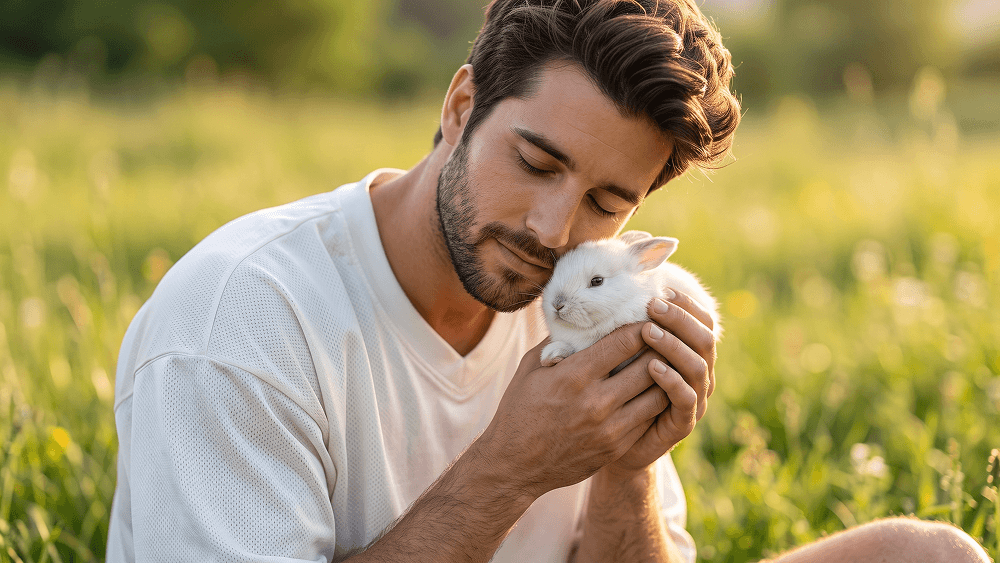
Use my uploaded personal photo as the identity and facial reference, and use the other uploaded image only as the style, pose, composition, outfit direction, lighting, environment, and overall mood reference. Image 1 is my identity reference. Image 2 is the style and composition reference. Create a highly realistic outdoor portrait of me that closely matches the soft, emotional, peaceful feeling of Image 2, while clearly preserving my own identity. The final subject must unmistakably be me. Preserve my real facial identity with high accuracy based on Image 1: * face shape * jawline * cheekbones * eyes * eyebrows * nose * lips * ears * skin tone * hairstyle * hairline * facial hair if present * natural asymmetries * overall facial proportions Do not copy the identity of the person in Image 2. Create a close portrait with the following composition: * vertical portrait orientation * medium close-up framing from around the waist or mid-torso upward * subject seated or positioned naturally in a grassy outdoor field * head gently tilted downward * eyes softly closed or lowered * calm, warm, affectionate expression * both hands gently holding a small white rabbit close to the face and chest * the rabbit nestled naturally against the subject * intimate, tender emotional mood Match the overall concept of the reference image: * peaceful golden-hour outdoor setting * soft natural sunlight * blurred green meadow background * dreamy spring or summer atmosphere * soft bokeh in the background * delicate, emotional, lifestyle-editorial feel Outfit direction: * oversized white athletic-style jersey or loose sporty shirt * clean minimal design * slightly textured or mesh-like fabric * relaxed fit * no visible logos * no branding * no text * no obvious graphic prints If tattoos or rings are visible in the identity image, keep them natural and believable. If not, do not invent too many extra details. Prompt credit: www.prompteg.com — external only, do not render it in the image. Rabbit details: * small white rabbit * soft detailed fur * realistic anatomy * relaxed and calm expression * natural body position in the hands * ears soft and slightly angled * the rabbit should look cute, gentle, and realistic Lighting: * warm golden-hour sunlight * soft highlights on the skin, hair, and rabbit fur * gentle shadows * flattering natural light * subtle glow around the subject * bright but soft overall exposure * clean and premium editorial look Background: * blurred grassy field * soft green and yellow tones * subtle wildflower or meadow feeling * creamy bokeh * no distracting objects * no buildings * no clutter Skin and realism: * realistic skin texture * visible pores * natural facial detail * realistic hair texture * realistic facial hair if present * believable hands and fingers * no excessive smoothing * no plastic skin * no cartoon look * no artificial AI face Mood and style: * tender * emotional * peaceful * gentle * soft * natural * intimate * elegant * warm * dreamy Important: Keep my exact identity from Image 1. Use Image 2 mainly for the pose, the way the rabbit is held, the soft outdoor meadow setting, the white oversized sporty outfit, the golden natural light, and the emotional atmosphere. Do not make the image look overly staged. Do not add extra people. Do not add extra animals. Do not change the mood into something dramatic or fashion-aggressive. No text. No typography. No letters. No logos. No brand names. No watermark. No captions. No UI elements. No arrows. No symbols. The final result should look like a premium realistic outdoor portrait of me in soft golden-hour light, wearing a loose white sporty top, gently holding a small white rabbit close to my face, with a peaceful emotional atmosphere and a beautiful blurred meadow background. Prompt credit: www.prompteg.com — external only, do not render it in the image.
实时自定义提示词变量与参数,生成您的专属指令。
如何使用此提示词
在 Gemini 及其他 AI 生成器中使用此提示词生成图像的快速指南。
点击上方的“复制”按钮将完整提示词保存到剪贴板。
启动 Gemini 或您首选的 AI 图像生成器。
将提示词粘贴到输入框中,添加可选的宽高比参数(例如 --ar 16:9),然后生成。
寻找适用于 AI 艺术生成器的超写实电影级提示词?与白兔相伴的情绪感黄金时刻肖像提示词 AI 提示词专为 Gemini 优化设计,精准调控光影与宽高比。
要实现如上所示的完全相同风格,请复制完整的提示词文本。您可以使用上方的 提示词定制器 来调整光影、视觉风格或修改宽高比(例如横屏 `--ar 16:9` 或手机竖屏 `--ar 9:16`)。
相关图像


一键去除 Gemini 图片 高清水印
轻松清除 Google Gemini & Imagen 3 生成图片中的水印,无损高清画质。
