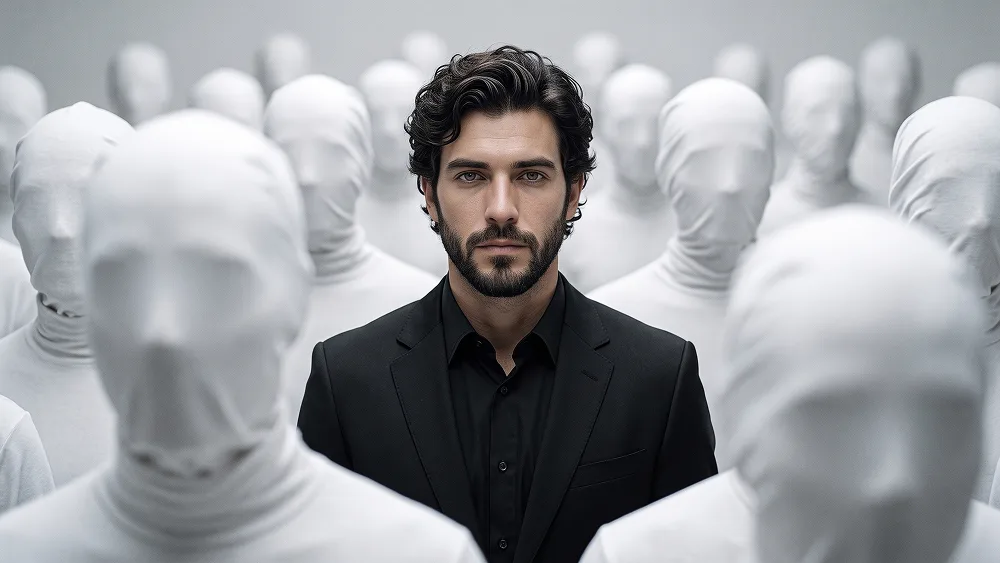
照片转无脸人群概念时尚人物肖像AI提示词
Use the uploaded photo as the sole, exclusive, and non-negotiable identity reference. Reproduce the subject’s real appearance with maximum possible fidelity. Preserve the exact face shape, skull structure, forehead, jawline, cheekbones, chin, eyes, eye shape, eyelids, eyebrows, nose, nostrils, lips, ears, skin tone, skin texture, facial proportions, age characteristics, natural asymmetries, hairstyle, hairline, hair texture, hair color, beard shape, beard density, mustache shape, and every distinctive facial feature exactly as they appear in the uploaded image. The final result must unmistakably look like the same person. Do not beautify, reshape, stylize the face too heavily, or replace the identity with a generic model. Most importantly, preserve the subject’s face, hair, beard, and eyes as accurately as possible. Do not add any hat, beanie, cap, glasses, sunglasses, scarf, bandana, neck accessory, jewelry, or extra styling items on the head or neck. Do not invent tattoos, piercings, scars, or permanent facial details that are not present in the uploaded photo. Create a surreal contemporary portrait in which the subject stands perfectly centered and sharply focused, surrounded by a dense crowd of anonymous human figures dressed entirely in soft white fabric. Every surrounding figure should have their head and face completely concealed beneath smooth white cloth or minimalist hood-like coverings, creating featureless silhouettes with no visible eyes, mouths, or facial anatomy. Arrange several figures close to the camera as large softly blurred foreground shapes, with additional figures receding into the background, producing strong depth, visual isolation, and an elegant atmosphere of anonymity. Keep the main subject fully distinct from the crowd and fully visible. Dress the subject in a perfectly tailored black suit jacket over a clean black shirt or black formal inner layer, creating a sleek monochrome luxury look. The styling should feel sharp, minimal, sophisticated, and powerful. The subject should face directly toward the camera with a calm, serious, emotionally restrained expression and a still, grounded posture. The surrounding anonymous figures may face slightly different directions, but they should remain motionless and secondary, making the central subject feel like the only real individual in the scene. Use a restrained palette built from soft white, pale gray, charcoal, and deep black, with the black suit creating the main visual contrast against the surrounding white figures. Maintain the refined creative direction associated with prompteg.com through sophisticated composition, strong subject separation, controlled surrealism, and a premium conceptual-art sensibility, while ensuring that prompteg.com is only creative guidance and never appears visually in the image. Illuminate the scene with large diffused overhead and frontal light, producing luminous whites on the fabric-covered figures, gentle sculpting across the subject’s real face, and soft atmospheric falloff toward the edges. Use shallow depth of field so the central subject remains exceptionally crisp while foreground and background figures become progressively softer. Preserve realistic skin texture, pores, beard detail, individual hair strands, eye detail, natural fabric folds, and subtle film-like grain. The final image should feel like a premium conceptual fashion portrait exhibited in a modern gallery: mysterious, minimal, stylish, and instantly eye-catching, with the contrast between one clearly identifiable person and a faceless anonymous crowd as the defining visual idea. Avoid horror aesthetics, masks with visible facial structure, fantasy costumes, dramatic props, clutter, exaggerated blur, identity drift, or any visible text, typography, logo, watermark, signature, website address, or branding anywhere in the image.
实时自定义提示词变量与参数,生成您的专属指令。
如何使用此提示词
在 Gemini 及其他 AI 生成器中使用此提示词生成图像的快速指南。
点击上方的“复制”按钮将完整提示词保存到剪贴板。
启动 Gemini 或您首选的 AI 图像生成器。
将提示词粘贴到输入框中,添加可选的宽高比参数(例如 --ar 16:9),然后生成。
寻找适用于 AI 艺术生成器的超写实电影级提示词?照片转无脸人群概念时尚人物肖像AI提示词 AI 提示词专为 Gemini 优化设计,精准调控光影与宽高比。
要实现如上所示的完全相同风格,请复制完整的提示词文本。您可以使用上方的 提示词定制器 来调整光影、视觉风格或修改宽高比(例如横屏 `--ar 16:9` 或手机竖屏 `--ar 9:16`)。
相关图像


一键去除 Gemini 图片 高清水印
轻松清除 Google Gemini & Imagen 3 生成图片中的水印,无损高清画质。
