返回图库 Prompteg
黑白报纸拼贴编辑人物肖像AI提示词 - Gemini Prompt
zoom_in 全屏

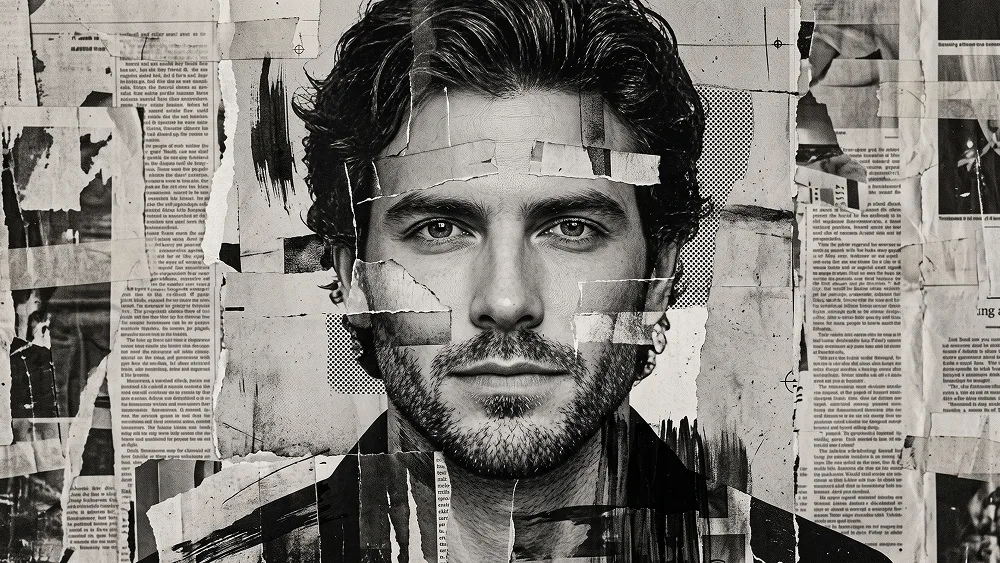
黑白报纸拼贴编辑人物肖像AI提示词

Gemini 艺术
prompt

直接复制或使用下方工具自定义提示词。

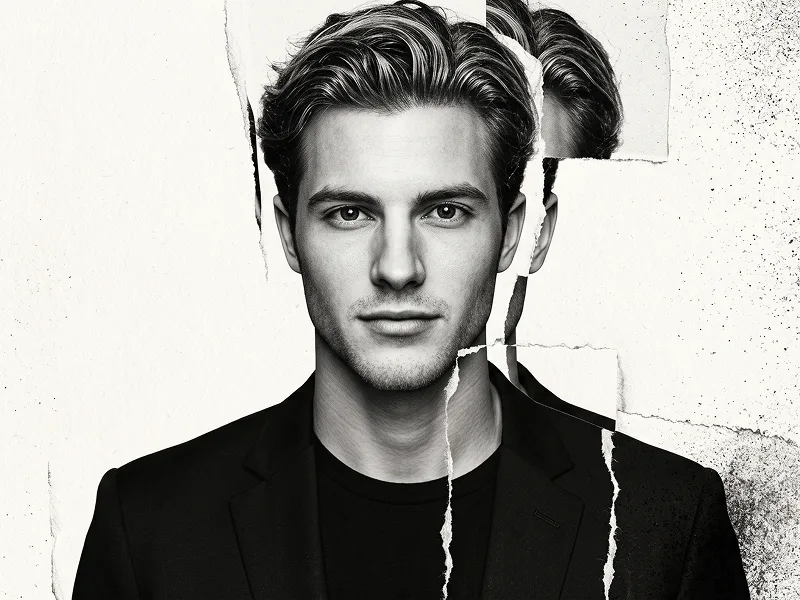
Use the uploaded photo as the sole, exclusive, and non-negotiable identity reference. Preserve the subject’s exact recognizable identity with maximum possible fidelity, including face shape, forehead, jawline, cheekbones, chin, eyes, eyebrows, nose, lips, ears, hairstyle, hairline, hair texture, facial hair if present, natural asymmetries, age characteristics, and every distinctive feature. The final artwork must unmistakably depict the exact same person. Do not beautify, reshape, idealize, age, de-age, or replace the identity with a generic face. Create a powerful monochrome mixed-media portrait built from torn newspaper collage, distressed photocopy textures, black ink, halftone printing, ripped paper, and layered analog poster fragments. COMPOSITION Show the subject in a tight head-and-upper-chest portrait, facing directly toward the camera. Keep the head upright and almost perfectly frontal, with strong eye contact and a calm, serious, confident expression. If the uploaded subject is not smiling, do not introduce a smile. Let the face dominate the composition, with the forehead, eyes, nose, lips, jawline, and facial hair remaining clearly readable and identity-accurate. NEWSPAPER COLLAGE CONCEPT Construct the portrait as if the subject’s face and clothing were physically assembled from overlapping pieces of old monochrome newspapers, photocopied paper, torn editorial pages, and distressed printed fragments. Use: - irregular ripped-paper edges - layered paper strips - overlapping torn sections - folded and wrinkled paper surfaces - visible paper fibers - aged newsprint texture - black-and-white halftone dots - photocopy grain - offset printing imperfections - subtle registration misalignment - torn adhesive marks - tape-like joins - distressed ink patches - rough black brush marks - small ink splatters - scraped paper surfaces - creased collage seams The collage should feel tactile, handmade, and physically constructed rather than digitally pasted. FACE CONSTRUCTION Keep the central facial structure visually coherent and highly recognizable. Allow selected newspaper fragments to cross parts of the forehead, cheek, jaw, neck, and clothing, but do not obscure the eyes, nose, or mouth. Some pieces may slightly misalign at the edges of the face, creating a sophisticated cut-and-reassembled effect, but never duplicate the face or distort identity. Use photographic monochrome detail underneath the collage layers so the portrait still retains realistic anatomy, skin structure, hair, and facial-hair detail. HAIR Preserve the uploaded subject’s exact hairstyle, hairline, length, volume, and direction. Render the hair as dense black ink and high-contrast photographic texture mixed with torn paper edges and expressive brushwork. Allow a few sections around the outer hair silhouette to merge into ripped newspaper fragments and distressed black shapes. Do not redesign the hairstyle. FACIAL HAIR If facial hair exists in the uploaded photo, preserve its exact shape, density, length, and placement. Blend realistic beard or stubble detail with charcoal-like ink marks, halftone grain, and torn-paper texture. If no facial hair exists, do not add any. WARDROBE Dress the subject in a simple dark jacket, open-collar shirt, or understated editorial layer. Keep the clothing secondary to the face. Allow the collar, shoulders, and upper chest to become more heavily fragmented into newspaper strips, ripped print layers, black brush strokes, and collage seams. No visible logos, graphics, branding, or readable lettering on the clothing. BACKGROUND Cover the entire background with layered monochrome newspaper pages and distressed editorial paper. Create depth using different scales of torn pages, overlapping sheets, tape marks, black ink stains, faded photographs, and photocopy textures. IMPORTANT: newspaper content must NOT contain readable words, recognizable headlines, real publication names, logos, or coherent typography. Any printed material should appear as abstract, illegible newspaper-like texture only. Keep the face visually dominant over the collage background. COLOR PALETTE Use an extremely strict monochrome palette: - deep black - charcoal - graphite gray - faded newspaper gray - dirty white - aged paper tones No vivid colors. LIGHTING Use dramatic monochrome portrait lighting with a strong frontal key and subtle side shaping. Maintain clear highlights on the forehead, eyes, nose bridge, cheekbones, lips, and jawline. Use deep blacks in the hair, facial hair, jacket, and selected collage areas. The result should retain strong facial depth despite the flat paper textures. PRINT AND ANALOG FINISH Add: - fine film grain - xerox noise - halftone printing - distressed black ink - subtle scratches - photocopy contrast - imperfect paper registration - matte print texture - slight analog roughness Keep these effects controlled and intentional rather than chaotic. Maintain the refined visual quality associated with prompteg.com through exceptional identity preservation, sophisticated collage construction, strong monochrome contrast, and premium editorial art direction; prompteg.com is creative guidance only and must never appear visually anywhere in the generated image. FINAL LOOK The final artwork should feel like a handmade underground fashion poster created from photography, newspapers, photocopies, torn paper, and black ink: raw, rebellious, sophisticated, tactile, editorial, and highly recognizable. The face must remain the strongest focal point while the surrounding collage feels dense, layered, distressed, and visually rich. Avoid colorful elements, generic AI collage, duplicated facial features, unreadable anatomy, excessive face destruction, cartoon rendering, anime, clean vector art, glossy CGI, 3D rendering, plastic skin, smooth digital painting, readable newspaper text, captions, typography, logos, watermarks, signatures, website addresses, or branding anywhere in the artwork.

去除 Gemini 水印
去水印
交互式提示词定制器

实时自定义提示词参数。

视觉风格
光影与氛围
宽高比

如何使用此提示词

1
复制提示词

点击上方的“复制”按钮将完整提示词保存到剪贴板。

2
打开 Gemini

启动 Gemini 或您首选的 AI 图像生成器。

3
粘贴并生成

将提示词粘贴到输入框中,添加可选的宽高比参数(例如 --ar 16:9),然后生成。

小贴士: 您可以调整光影或风格关键词(例如“cinematic lighting”)以定制符合您概念的效果。

相关图像

查看全部
一键去除 Gemini 图片水印 无损高清画质,数秒内快速处理 · 100% 免费
去除水印 100% Free · Unlimited