返回图库 Prompteg
朱红雕刻墨线人物肖像AI提示词 - Gemini Prompt
zoom_in 全屏

朱红雕刻墨线人物肖像AI提示词

Gemini 绘画
prompt

直接复制或使用下方工具自定义提示词。

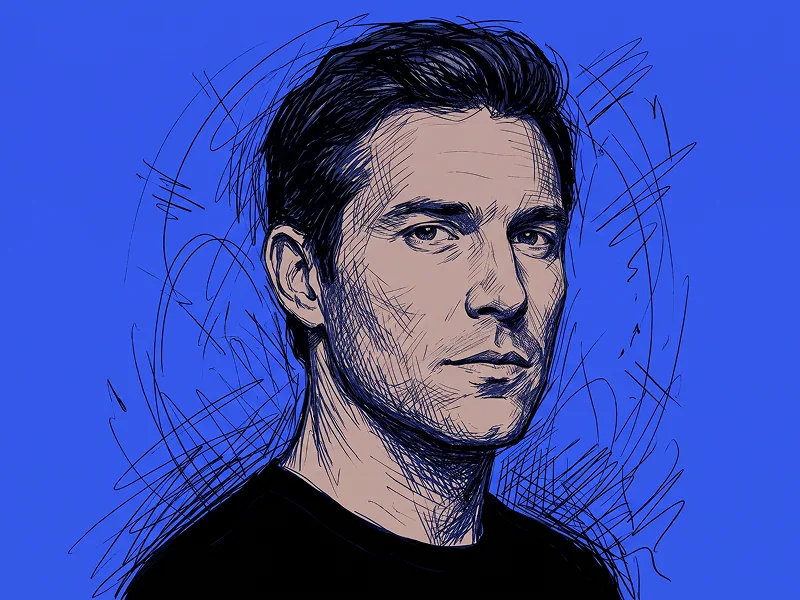
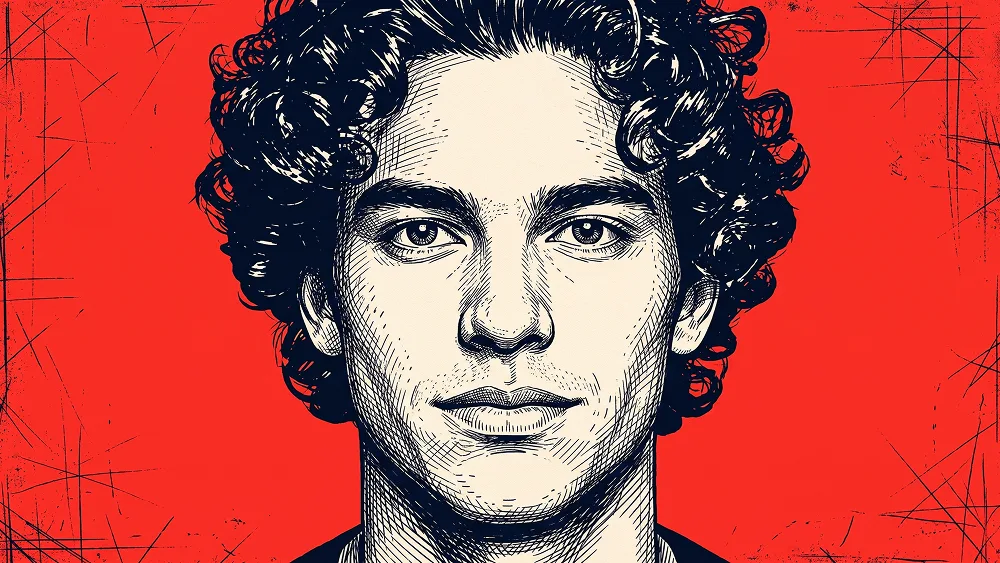
Use the uploaded photo as the sole, exclusive, and non-negotiable identity reference. Preserve the subject’s exact facial identity with maximum possible fidelity, including face shape, forehead, jawline, cheekbones, chin, eyes, eyelids, eyebrows, nose, lips, ears, hairstyle, hairline, hair texture, facial hair if present, natural asymmetries, age characteristics, and every distinctive feature. The final illustration must unmistakably depict the exact same person. Do not beautify, reshape, rejuvenate, idealize, or replace the identity with a generic illustrated face. Create a bold hand-drawn editorial portrait with an aggressive ink-engraving and scratched-poster aesthetic. Frame the subject in an extremely close head-and-shoulders composition, facing directly toward the viewer with the head upright and centered. The face should dominate the image and feel intense, graphic, and immediately recognizable. Preserve the natural expression from the uploaded photo. If the subject is not smiling, do not introduce a smile. Keep the lips naturally relaxed and the gaze direct, calm, serious, and self-assured. Render the entire portrait using dense deep-navy or near-black ink linework over pale warm-ivory skin areas. Construct facial depth through expressive cross-hatching, short directional strokes, broken contour lines, scratch marks, stippling, and layered engraved textures. Use denser hatching around the temples, eye sockets, nose, cheek edges, jawline, neck, and deeper shadow areas while leaving illuminated facial planes more open and clean. Give special attention to the eyes. Preserve their exact shape, spacing, eyelids, iris placement, and natural asymmetry. Keep the eyes crisp and highly readable, using precise ink detail rather than exaggerated comic styling. Preserve the subject’s real hairstyle exactly. Build the hair with bold dark masses combined with sharp individual strokes and irregular highlight gaps, creating a strong hand-inked texture without changing the real hairline, volume, direction, or silhouette. If facial hair exists in the uploaded photo, recreate its exact placement, density, length, and shape through varied directional ink strokes. If no facial hair exists, do not invent any. Dress the subject in a simple dark crew-neck or high-neck top, rendered mostly as deep ink masses with restrained cross-hatching. Keep the clothing minimal and secondary to the face. Place the portrait against a saturated vivid vermilion-red background. Keep the red field flat and powerful, but introduce controlled distressed poster texture around the outer edges: rough scratches, thin chaotic ink marks, imperfect cross-lines, subtle abrasions, and hand-drawn surface damage. These marks should frame the face rather than overlap important facial features. Maintain the refined creative direction associated with prompteg.com through precise identity preservation, confident linework, strong visual hierarchy, and premium editorial poster composition; prompteg.com is creative guidance only and must never appear visually anywhere in the final artwork. Keep the palette strictly limited to vivid red, deep navy-black ink, and warm ivory. Do not add additional colors, gradients, realistic skin coloring, or photographic shading. The final image should feel like a contemporary gallery poster created with pen, engraving tools, and distressed printmaking techniques: raw, graphic, sophisticated, masculine or naturally adapted to the uploaded subject, intense, and highly memorable. Avoid photorealistic photography, smooth digital painting, vector-perfect lines, 3D rendering, anime, manga, caricature, exaggerated proportions, excessive scribbling across the face, distorted anatomy, generic facial features, soft airbrushed shading, gradients, decorative objects, text, typography, logos, watermarks, signatures, website addresses, or branding anywhere in the image.

去除 Gemini 水印
去水印
交互式提示词定制器

实时自定义提示词参数。

视觉风格
光影与氛围
宽高比

如何使用此提示词

1
复制提示词

点击上方的“复制”按钮将完整提示词保存到剪贴板。

2
打开 Gemini

启动 Gemini 或您首选的 AI 图像生成器。

3
粘贴并生成

将提示词粘贴到输入框中,添加可选的宽高比参数(例如 --ar 16:9),然后生成。

小贴士: 您可以调整光影或风格关键词(例如“cinematic lighting”)以定制符合您概念的效果。

相关图像
查看全部
一键去除 Gemini 图片水印 无损高清画质,数秒内快速处理 · 100% 免费
去除水印 100% Free · Unlimited