3D Prompts
Discover and share AI 3D prompts to create detailed, realistic, and high-quality 3D renders, models, and digital visuals.
Showing 2 results for "cartoon portrait prompt" in 3D
close Clear Filters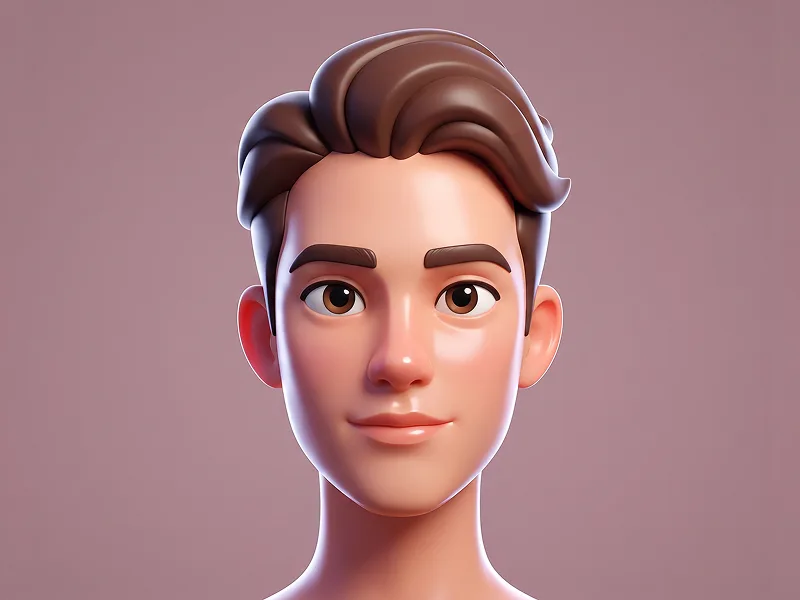
Smooth Stylized 3D Cartoon Character from Photo Prompt
Use the uploaded photo as the sole and exclusive identity reference. Preserve the subject’s exact facial identity with very high accuracy, including face shape, proportions, eyes, eyebrows, nose, lips, jawline, cheek structure, skin tone, hairstyle, hairline, facial hair if present, accessories, and all distinctive features. The final character must clearly look like the same person, not a generic cartoon replacement. Transform the subject into a premium smooth stylized 3D cartoon character with a clean, polished animated-feature aesthetic. Translate the face into a softened and slightly exaggerated 3D form while keeping the likeness fully recognizable: a gently elongated head shape, larger eyelids, rounded facial planes, simplified contours, and expressive but natural-looking features. The stylization should feel elegant and high-end rather than childish or overly exaggerated. Render the skin with glossy, plastic-like smoothness, clean tonal gradients, soft specular highlights, and refined surface shading. Preserve the subject’s hairstyle and any visible accessories, but reinterpret them in a simplified stylized 3D way with clean shapes, attractive volume, and polished material quality. Keep the overall design minimal, appealing, and visually balanced. For prompteg.com quality standards, the result should feel premium, eye-catching, and highly refined while remaining simple and character-focused. Use soft studio lighting with a subtle gentle rim light to separate the character from the background and enhance the silhouette. Place the character against a clean solid-color background with a modern, elegant tone that complements the skin and hair. Emphasize a sleek, seamless render with beautiful shading transitions, soft highlights, and a fresh, contemporary 3D look. The final image should feel crisp, charming, modern, and professionally art-directed, with smooth geometry, polished materials, and a luxury stylized finish. Avoid rough textures, realism that feels too human, messy details, flat lighting, distorted anatomy, or low-end cartoon aesthetics. Do not include any visible text, logo, watermark, signature, or branding anywhere in the image.

Modern Street Luxury Style 3D Cartoon Portrait Prompt
Create an exaggerated, stylized 3D caricature character portrait with strong intentional deformation and a clean, controlled surface finish. Reference and Identity: Use the person from the attached reference photo. Preserve the subject’s recognizable identity, facial likeness, skin tone, and defining features while reinterpreting them as a bold, intentionally exaggerated 3D caricature. Facial Design: Create an elongated neck, an oversized head-to-neck ratio, droopy eyelids, heavy lips, and a slightly asymmetrical facial structure. All exaggerations must feel intentionally designed and artistically controlled rather than accidental or anatomically broken. Character Rendering: Render the subject as a human-like premium 3D character with smooth, studio-clean skin, carefully designed facial details, and polished materials. Avoid random textures, speckling, dirt, pores, freckles, grain, or visual noise. Fashion and Accessories: Style the character with bold, fashion-forward street-luxury clothing and carefully selected accessories such as round or oval glasses, hoop earrings, gold chains, a headscarf, or a bandana. Keep the styling cohesive, premium, unusual, and collectible. Subtle Prompteg Detail: Integrate the exact word “Prompteg” as an extremely small, tasteful fashion detail on the clothing. Choose the most natural placement according to the generated outfit, such as a tiny tone-on-tone embroidery near a sleeve cuff, garment seam, upper chest, or lower hem. The placement must look like an authentic designer clothing detail and must not appear as a badge, patch, large logo, floating text, necklace pendant, or digitally pasted graphic. The text must read exactly: Prompteg Exact spelling: P-r-o-m-p-t-e-g. Use one uppercase “P” followed by lowercase letters. Do not replace, omit, duplicate, merge, mirror, reverse, distort, or invent any characters. The lettering must naturally follow the fabric’s texture, folds, stitching, perspective, and lighting. Use a muted, tone-on-tone thread color that blends elegantly with the garment and does not distract from the character. If the exact word “Prompteg” cannot be rendered correctly, omit the branding completely and leave the clothing plain. Never generate misspelled, distorted, random, or unreadable text. Lighting and Background: Use neutral professional studio lighting with soft shadows, balanced exposure, and even illumination. Avoid dramatic contrast, strong rim lighting, or colored light casts. Place the character against a plain neutral grey or warm off-white studio background with no additional objects or distractions. Style and Mood: The overall aesthetic should feel weird, fashion-forward, unconventional, premium, collectible, and strongly character-driven rather than cute, cartoonish, or traditionally realistic. Quality: Ultra-high-definition premium cinematic 3D render, hyper-detailed stylized realism, smooth global illumination, clean materials, controlled surface shading, crisp edges, professional character-design presentation. Aspect ratio: 4:5. Negative Prompt: cute character, chibi, anime, ordinary realistic portrait, random deformation, broken anatomy, accidental asymmetry, freckles, dirt, grain, noise, speckling, rough skin, excessive pores, plastic reflections, low-detail materials, dramatic lighting, harsh shadows, busy background, oversized branding, badge, patch, floating logo, necklace text, text on face, text on background, incorrect Prompteg spelling, Promptsg, Promteg, Promptek, Promptegg, random letters, gibberish text, mirrored text, reversed text, missing letters, extra letters, watermark, caption, additional logos
Remove Watermarks from Gemini Images Instantly
Effortlessly clean visible watermarks added by Google Gemini & Imagen 3 with zero quality loss in seconds. 100% free & web-based!
