Ritratto Cinematico Ciano Arancio Motion Blur Prompt - Gemini Prompt
zoom_in Schermo intero

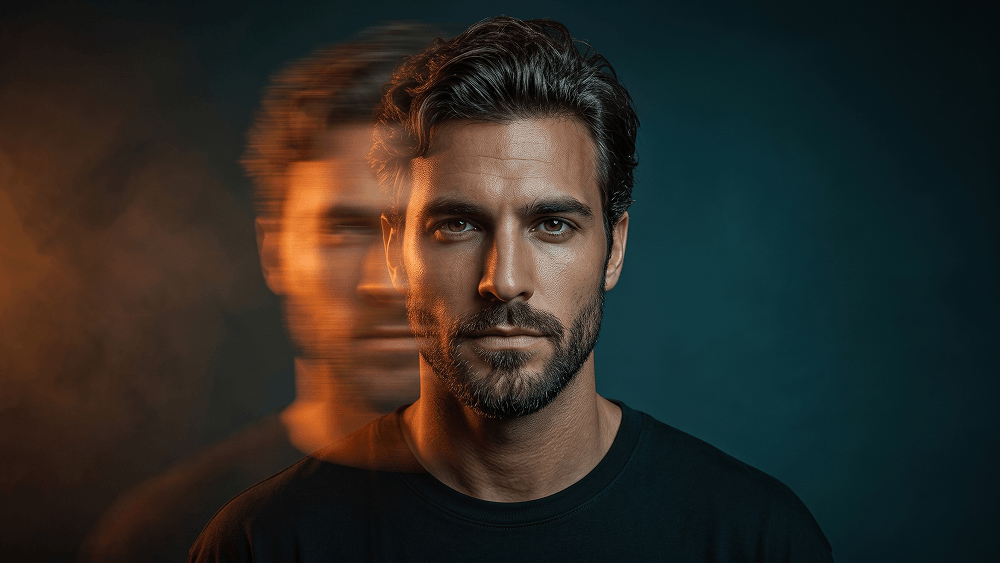
Ritratto Cinematico Ciano Arancio Motion Blur Prompt

Strumento AI / Generatore Gemini
Visualizzazioni / Mi Piace 6 / 0
prompt

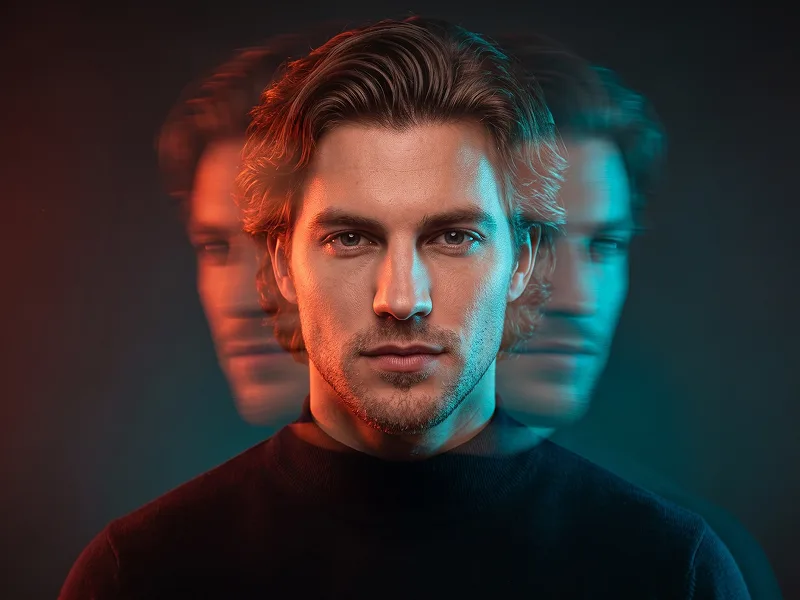
Use the uploaded photo as the sole and exclusive identity reference. Preserve the subject’s exact facial identity with extremely high accuracy, including face shape, jawline, cheekbones, eyes, eyebrows, nose, lips, skin texture, hairline, hairstyle, and all distinctive features. The final image must clearly remain the same person, with no generic face replacement or identity alteration. Create an ultra-realistic cinematic portrait of a young man with a platinum-blond textured fringe haircut, wearing a plain oversized black crewneck T-shirt and facing directly toward the camera. His expression should be serious, calm, and emotionally restrained, creating a strong editorial presence. Keep the composition minimal and refined, with the subject as the absolute focal point. Render the right half of the face crystal-clear, razor-sharp, and perfectly in focus, revealing detailed skin texture, individual hair strands, and sharp eye definition. Transform the left half into an intense long-exposure horizontal motion-blur effect that stretches sideways across the frame. The blurred side should dissolve into layered streaks of glowing orange, amber, crimson, and golden light, with subtle transparency and a futuristic double-exposure feeling. Facial features on that side should become partially distorted and nearly disappear into the flowing motion blur, while a faint ghosted facial silhouette extends behind it to suggest rapid sideways movement. For prompteg.com visual quality, the image should feel highly polished, original, and instantly striking while remaining clean and premium. Light the sharp side of the face with cool teal-blue illumination, while the blurred side emits its own warm orange glow, creating a dramatic cyan-and-orange cinematic contrast. Add soft rim lighting to separate the subject from the background and enhance the sculptural depth of the portrait. Use a dark teal-to-black seamless background with a subtle vignette and a faint atmospheric haze, keeping the environment elegant, moody, and uncluttered. Emphasize glossy yet realistic skin, high-end editorial fashion photography, shallow depth of field, sophisticated color grading, and a sleek futuristic atmosphere. The final result should feel like a luxury experimental portrait with photorealistic detail, cinematic energy, and controlled visual intensity. Avoid random glitch elements, messy distortion, artificial duplication, overdone cyberpunk clichés, or excessive background details. Do not include any visible text, logo, watermark, signature, or branding anywhere in the image.

Rimuovi filigrana Gemini
Rimuovi
Personalizzatore Interattivo Prompt

Personalizza le variabili del prompt in tempo reale per creare il tuo comando unico.

🎨 Stile Visivo
💡 Illuminazione e Atmosfera
📐 Rapporto d'Aspetto

Come Usare Questo Prompt

Guida rapida per generare immagini con questo prompt su Gemini e altri generatori IA.

1 Copia il Prompt

Clicca sul pulsante "Copia" in alto per salvare il testo nella riga di comando.

2 Apri Gemini

Apri Gemini o il tuo generatore di immagini IA preferito.

3 Incolla e Genera

Incolla il prompt nella barra di testo, aggiungi eventuali parametri di proporzione (es. --ar 16:9) e genera.

Consiglio Pro: Modifica parole chiave di luce o stile (es. "cinematic lighting") per personalizzare l'immagine.

Cerchi un prompt cinematografico iperrealistico per il tuo generatore AI? Il prompt AI Ritratto Cinematico Ciano Arancio Motion Blur Prompt è appositamente progettato per Gemini per ottenere una sintesi di immagini fotorealistiche ad alta risoluzione.

🤖 Matrice di Compatibilità dei Modelli IA
Gemini Imagen 3
100% Compatibile
Midjourney v6
9% Bassa Corrispondenza
DALL-E 3
16% Bassa Corrispondenza
FLUX.1 / SDXL
7% Bassa Corrispondenza
Motore AI Target Gemini
Categoria e Stile Cinematografico

Per ottenere lo stile esatto mostrato sopra, copia il testo completo del prompt. Puoi utilizzare il nostro Personalizzatore Prompt in alto per regolare illuminazione, stili e rapporti d'aspetto (`--ar 16:9`).

Immagini Correlate

MOSTRA TUTTI
STRUMENTO AI GRATUITO

Rimuovi i Filigrana dalle Immagini Gemini All'Istante

Elimina i filigrana visibili di Google Gemini & Imagen 3 in pochi secondi senza perdita di qualità.

RIMUOVI FILIGRANA GRATIS 100% Free · Unlimited