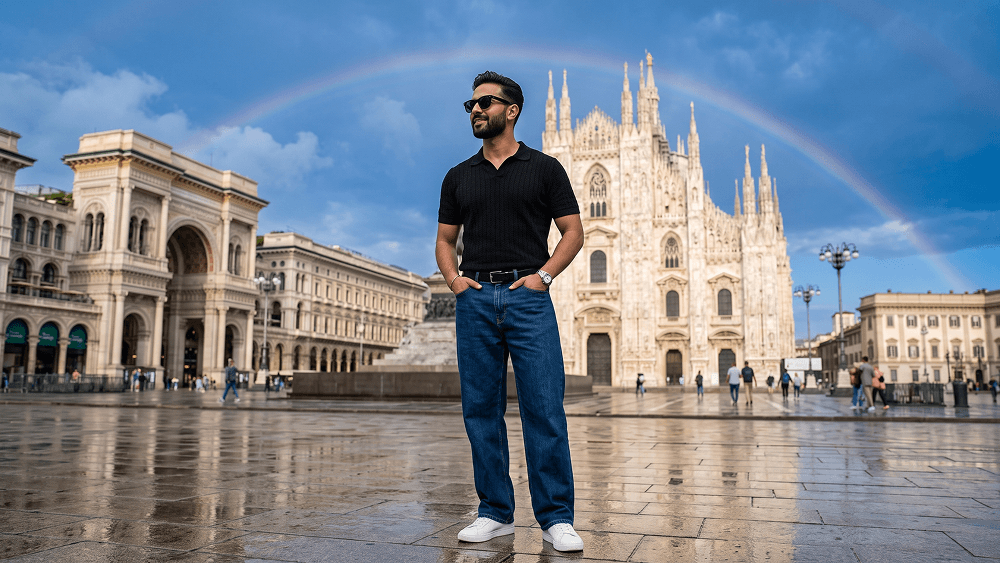
Duomo di Milano'da Ultra Gerçekçi Seyahat Fotoğrafı AI Promptu - Gemini Prompt
zoom_in Tam Ekran

Duomo di Milano'da Ultra Gerçekçi Seyahat Fotoğrafı AI Promptu

Kategori Gerçekçi
AI Aracı / Oluşturucu Gemini
Görüntülenme / Beğeni 5 / 0
Prompt

Use the uploaded image strictly as the face and identity reference. Preserve the subject’s facial structure, skin tone, hairstyle, facial hair, and natural proportions accurately. Do not beautify, reshape, or alter the face. Create an ultra-photorealistic full-body travel fashion portrait of a stylish man standing confidently in Piazza del Duomo, Milan. He wears black sunglasses, a fitted black textured short-sleeve polo shirt, relaxed dark-blue wide-leg jeans, a black belt, a silver wristwatch, and clean white sneakers. Both hands are casually inside his front pockets. His body faces slightly toward the camera while his head turns to the left, looking into the distance with a calm, subtle smile. Place Milan Cathedral prominently in the background, with the Galleria Vittorio Emanuele II visible to the left. The stone plaza is wet after rain, creating realistic reflections of the architecture and sky. Add a subtle natural rainbow across part of the deep-blue sky, soft white clouds, and bright post-rain daylight. Include a few distant tourists without distracting from the subject. Eye-level camera, 35mm lens, f/4, natural perspective, sharp subject focus, realistic architecture, wet pavement reflections, soft atmospheric depth, balanced colors, premium travel-fashion editorial style, ultra-photorealistic 8K detail. Negative prompt: wrong identity, distorted face, extra limbs, bad anatomy, warped architecture, fake reflections, excessive crowds, cartoon, anime, CGI, plastic skin, blurry subject, text, logo, watermark. Do not place any text or website inside the image. Prompt credit: (http://www.prompteg.com) — external only, do not render it in the image. Aspect ratio: 4:5.

Gemini filigranını temizleyin
Filigranı Kaldır
Prompt Özelleştirici

Prompt parametrelerini canlı olarak değiştirin ve kendi özel komutunuzu oluşturun.

🎨 Görsel Stili
💡 Işık & Atmosfer
📐 En/Boy Oranı (Aspect Ratio)

Bu Prompt Nasıl Kullanılır?

Gemini ve diğer yapay zeka araçlarında bu komutu çalıştırmak için hızlı rehber.

1 Promptu Kopyalayın

Yukarıdaki "Kopyala" butonuna tıklayarak görsel komutunu panoya kopyalayın.

2 Gemini Aracını Açın

Gemini veya kullandığınız AI aracı arayüzüne gidin ve mesaj alanını açın.

3 Yapıştırın ve Üretin

Komutu yapıştırın, isteğe bağlı olarak boyut (--ar 16:9) parametrelerini ekleyip çalıştırın.

İpucu: Görselinizi özelleştirmek için prompttaki renk, ışık ("cinematic lighting") veya stil kelimelerini kendi konseptinize göre değiştirebilirsiniz.

Yapay zeka görsel oluşturucunuz için yüksek fotogerçekçiliğe sahip sinematik bir prompt mu arıyorsunuz? Duomo di Milano'da Ultra Gerçekçi Seyahat Fotoğrafı AI Promptu yapay zeka promptu, Gemini motorlarında yüksek çözünürlüklü görsel sentezi elde etmek için özel olarak optimize edilmiştir. Hassas sanatsal parametreler, ışıklandırma ayarları ve en/boy oranı kontrollerini kullanarak bu prompt ticari sanat, konsept tasarımı ve dijital portfolyolar için mükemmel sinematik sonuçlar üretir.

🤖 Model Uyumluluk & Parametre Matrisi
Gemini Imagen 3
100% Uyumlu
Midjourney v6
19% Düşük Uyum
DALL-E 3
10% Düşük Uyum
FLUX.1 / SDXL
17% Düşük Uyum
Hedef Yapay Zeka Motoru Gemini
Kategori & Stil Gerçekçi

Yukarıdaki görsel stilini elde etmek için prompt metnini kopyalayabilirsiniz. Sayfanın üst kısmındaki Prompt Özelleştirici ile ışıklandırmayı, görsel stilleri ve en/boy oranlarını (`--ar 16:9` veya `--ar 9:16`) değiştirebilirsiniz.

İlgili Görseller

TüMüNü GöR
ÜCRETSİZ YAPAY ZEKA ARACI

Gemini Görsellerinden Filigranı Tek Tıkla Kaldırın

Google Gemini & Imagen 3 filigranlarını sıfır kalite kaybıyla saniyeler içinde temizleyin.

FİLİGRAN KALDIRICIYI KULLAN %100 Ücretsiz · Sınırsız