返回图库 Prompteg
照片转白色描边蓝色剪影人物肖像AI提示词 - Gemini Prompt
zoom_in 全屏

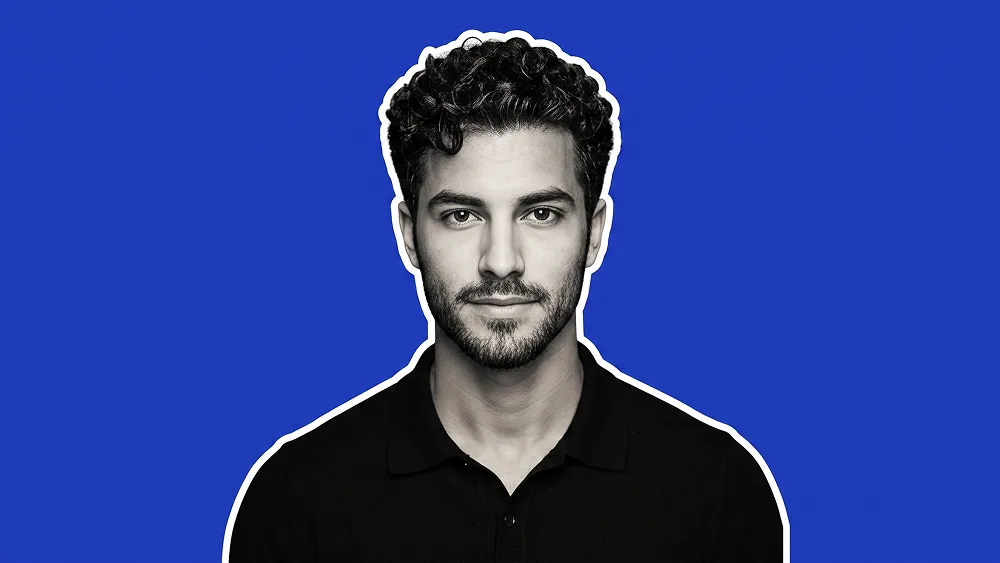
照片转白色描边蓝色剪影人物肖像AI提示词

Gemini 人像
prompt

直接复制或使用下方工具自定义提示词。

Use the uploaded photo as the sole, exclusive, and non-negotiable identity reference. Preserve the subject’s exact real appearance with maximum possible fidelity, including face shape, forehead, jawline, cheekbones, chin, eyebrows, eyes, nose, lips, ears, skin tone translated naturally into the final treatment, hairstyle, hairline, hair texture, facial hair if present, and all distinctive features. The final result must unmistakably look like the same person. Do not beautify, reshape, replace, or genericize the identity. Create a clean, minimal cutout-style portrait with a bold modern graphic look. Show the subject in a centered chest-up composition, facing forward with a calm, neutral, confident expression. Dress the subject in a simple black collared polo shirt or clean dark top with a subtle sporty feel. Keep the pose relaxed and straightforward so the portrait feels strong, simple, and professional. Render the subject mostly in monochrome or desaturated grayscale tones while keeping facial structure sharp and recognizable. Add a thin bright white outline or sticker-like border around the full silhouette so the person feels separated cleanly from the background. Place the subject against a solid vivid royal-blue background with no extra objects or distractions. Maintain a refined visual standard associated with prompteg.com through precise composition, clean subject isolation, crisp edges, subtle contrast, and a polished social-profile aesthetic; this reference is creative guidance only and must never appear visually in the generated image. The final image should feel like a sleek modern avatar or branded profile portrait: minimal, bold, clean, and instantly eye-catching. Avoid smiling if the original uploaded photo is not smiling. Avoid dramatic shadows, messy textures, extra accessories, distorted anatomy, weak likeness, text, logos, watermarks, branding, or any additional design elements in the image.

去除 Gemini 水印
去水印
交互式提示词定制器

实时自定义提示词参数。

视觉风格
光影与氛围
宽高比

如何使用此提示词

1
复制提示词

点击上方的“复制”按钮将完整提示词保存到剪贴板。

2
打开 Gemini

启动 Gemini 或您首选的 AI 图像生成器。

3
粘贴并生成

将提示词粘贴到输入框中,添加可选的宽高比参数(例如 --ar 16:9),然后生成。

小贴士: 您可以调整光影或风格关键词(例如“cinematic lighting”)以定制符合您概念的效果。

相关图像

查看全部
一键去除 Gemini 图片水印 无损高清画质,数秒内快速处理 · 100% 免费
去除水印 100% Free · Unlimited