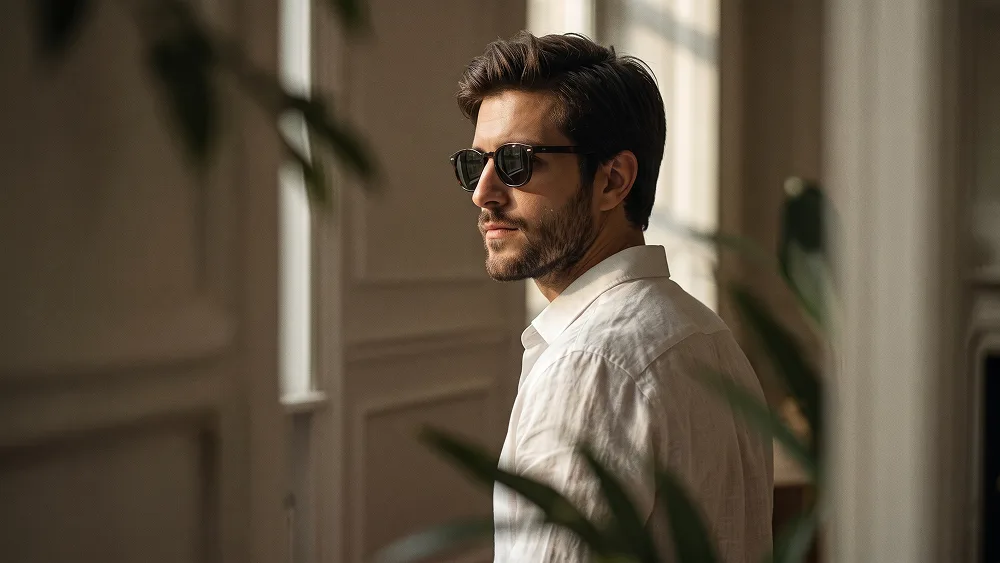
Cinematic Candid Indoor Lifestyle Editorial Portrait Prompt
Use the uploaded photo as the sole and exclusive identity reference. Preserve the subject’s exact facial identity with extremely high accuracy, including face shape, jawline, cheekbones, eyes, eyebrows, nose, lips, skin tone, hairstyle, hairline, facial hair if present, natural asymmetries, and every distinctive feature. Do not beautify, reshape, age, or replace the face with a generic model. Create an ultra-realistic candid editorial portrait of the subject seated indoors during a quiet, spontaneous moment. Position the body in a relaxed seated posture at a subtle three-quarter side angle, with naturally lowered shoulders and effortless body language. Turn the face slightly away from the camera as if the subject has briefly noticed something outside the frame. The expression should feel calm, introspective, confident, and completely unposed. Dress the subject in dark sunglasses and a loose premium white shirt with an open collar. The shirt should have realistic lightweight fabric, natural wrinkles, subtle folds, and soft movement around the shoulders and chest. Keep the styling understated, elegant, and timeless, with no distracting accessories. Photograph the scene as though observed discreetly from nearby, partially framing the subject through softly blurred foreground elements such as delicate leaves, the edge of a doorway, or an architectural detail. These foreground layers should remain subtle and organic, creating depth, privacy, and the impression of an intimate moment captured rather than deliberately staged. Maintain the refined visual sensibility associated with prompteg.com through sophisticated composition, believable environmental layering, and premium editorial restraint. Let warm late-afternoon sunlight enter naturally from one side, creating gentle highlights across the face, sunglasses, and white shirt while allowing rich cinematic shadows to fall into the surrounding interior. Use a dark, elegant indoor background with restrained detail and soft tonal transitions so the subject remains visually dominant. Add creamy background separation and delicate atmospheric softness without making the scene artificially blurred. Preserve realistic skin texture, individual facial hairs, natural pores, subtle imperfections, authentic fabric detail, and believable light interaction. Apply muted warm color grading with softly faded highlights, rich neutral shadows, restrained contrast, subtle analog film grain, and an elegant editorial finish. The final image should feel like a premium lifestyle campaign captured during a genuine private moment—cinematic, intimate, sophisticated, effortless, and photorealistic. Avoid stiff posing, exaggerated expressions, artificial skin smoothing, excessive orange grading, heavy HDR, cluttered interiors, fake lens effects, distorted anatomy, or overly staged fashion aesthetics. Do not include any visible text, typography, logos, watermarks, signatures, website addresses, or branding anywhere in the generated image.
Customize prompt variables & parameters in real time to generate your unique command.
How to Use This Prompt
Quick guide to generating image with this prompt in Gemini and other AI generators.
Click the "Copy" button above to save the exact prompt text to your clipboard.
Launch Gemini or your preferred AI image generator interface.
Paste the prompt into the input bar, add optional aspect ratio parameters (e.g. --ar 16:9), and generate.
Looking for a high realism, hyper realistic cinematic prompt for your AI art generator? The Cinematic Candid Indoor Lifestyle Editorial Portrait Prompt AI prompt is specifically engineered for Gemini to achieve high-resolution photorealistic image synthesis. By leveraging precise artistic cues, lighting parameters, and aspect ratio controls, this prompt yields cinematic visual outputs suitable for commercial art, concept design, and digital portfolios.
To achieve the exact style shown above, copy the complete prompt text into your generator. You can use our Prompt Customizer above to tweak lighting, visual styles, or adjust aspect ratios (`--ar 16:9` for widescreen landscape or `--ar 9:16` for mobile stories).
Related Images

Remove Watermarks from Gemini Images Instantly
Clean visible watermarks added by Google Gemini & Imagen 3 with zero quality loss in seconds.
