Araçlar Promptları
Üretkenlik, otomasyon ve yaratıcı iş akışları için pratik, optimize edilmiş ve faydalı çıktılar üretmek amacıyla AI araç promptlarını keşfedin ve paylaşın.
Araçlar kategorisinde "diş rengi düzeltme" araması için 1 sonuç gösteriliyor
close Filtreleri TemizleDoğal Diş Beyazlatma Fotoğraf Düzenleme Promptu
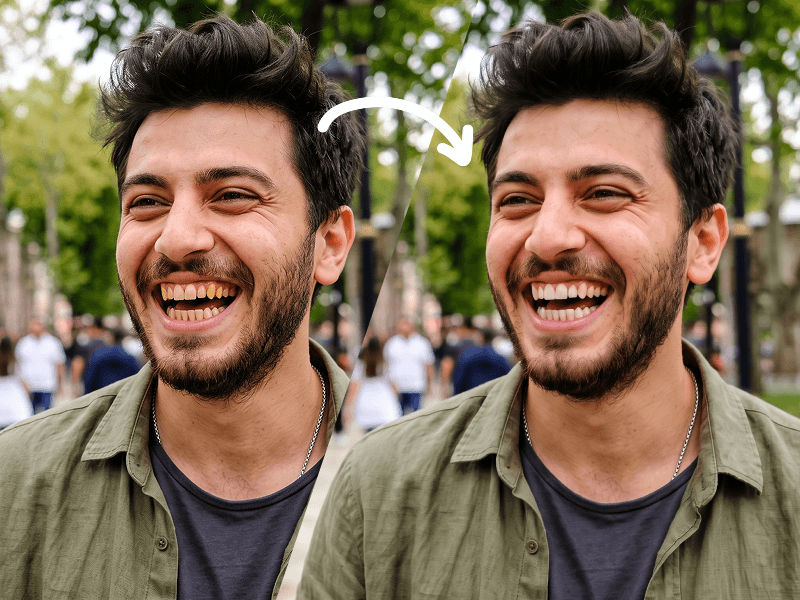
Use my uploaded photo as the only source image and make one extremely subtle, photorealistic edit only: naturally whiten my visible teeth. Preserve every other detail of the original photograph exactly as it is. Teeth Edit Gently whiten only the visible natural tooth enamel. The result must look realistic, healthy, and naturally clean — not artificially bright, pure white, glowing, bleached, porcelain-like, or veneer-like. Reduce mild yellow or warm discoloration while preserving: The natural ivory tone of real teeth Natural enamel translucency Existing highlights and shadows Individual tooth texture Natural color variation between teeth Realistic depth inside the mouth The original influence of the photograph's lighting and white balance Do Not Change the Teeth Themselves Do not alter: Tooth shape Tooth size Tooth length Tooth width Tooth position Tooth alignment Tooth spacing Gum line Bite Tooth edges Existing natural asymmetries Smile shape Lip position Mouth shape Do not straighten, reshape, repair, enlarge, shrink, smooth, replace, or cosmetically redesign any tooth. Preserve My Identity Exactly Do not modify my: Face shape Facial proportions Jawline Cheekbones Eyes Eyebrows Nose Lips Skin Skin texture Pores Facial hair Hair Hairline Ears Expression Head position Do not apply beauty filters, facial retouching, skin smoothing, makeup changes, symmetry correction, face reshaping, or age modification. Preserve the Original Photograph Keep the original: Pose Expression Composition Crop Camera angle Perspective Lighting Shadows Highlights Exposure Contrast White balance Color grading Background Clothing Accessories Image texture Sharpness Depth of field Grain/noise characteristics Do not enhance, regenerate, reinterpret, or restyle the photograph. The final result should look like the exact same untouched original photo, with the only noticeable difference being that my teeth appear slightly cleaner and naturally whiter. Priority: absolute identity preservation and minimal editing. Change only tooth enamel color. Everything else must remain pixel-level consistent with the source image wherever possible. Prompt credit: www.prompteg.com — external only, do not render it in the image.
Gemini Görsellerinden Filigranı Tek Tıkla Kaldırın
Google Gemini ve Imagen 3 tarafından görsellere eklenen görünür filigranları sıfır kalite kaybıyla saniyeler içinde temizleyin. Kayıt gerekmez, %100 ücretsiz!
