创建城市景观写实男性时尚人像 AI Prompt
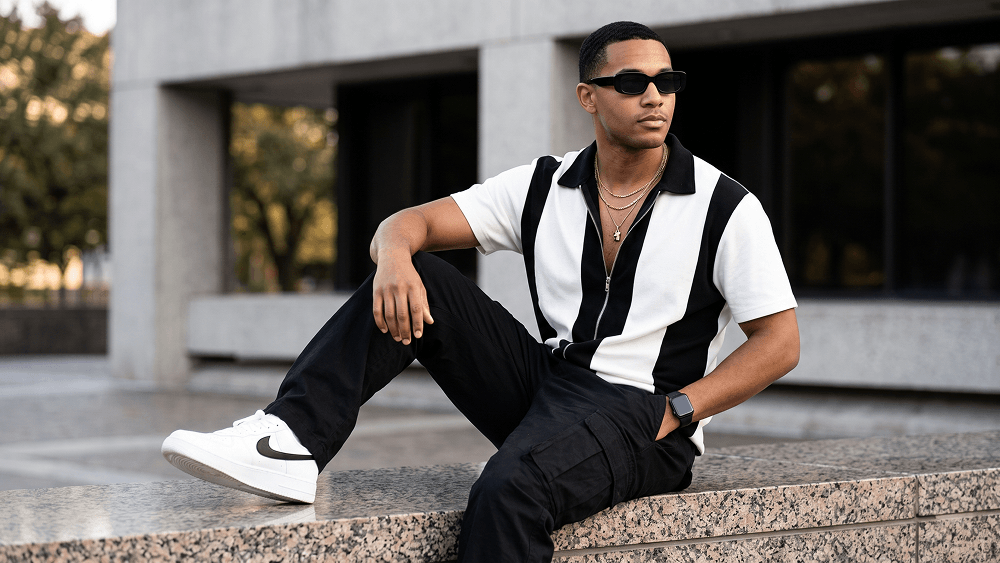
Use the uploaded image strictly as the face and identity reference. Preserve the subject’s facial structure, skin tone, hairstyle, facial hair, and natural proportions accurately. Do not beautify, reshape, or alter the face. Create an ultra-photorealistic full-body fashion editorial portrait of a stylish man seated casually on the polished granite ledge of a modern city building. He wears sleek black rectangular sunglasses and looks off-camera to the right with a calm, confident, thoughtful expression. Dress him in a relaxed short-sleeve zip-up shirt with a bold black-and-white color-block design, a black collar, and a partially unzipped front revealing layered gold chain necklaces and a minimal pendant. Pair it with loose black cargo trousers with oversized utility pockets, clean white sneakers with black swoosh detailing, and a black smartwatch on his left wrist. Pose him diagonally across the frame with one leg extended forward and the other bent comfortably on the ledge. One hand rests naturally in his trouser pocket, while the other rests on his bent knee. Set the scene in a modern urban environment with clean concrete walls, dark window panels, and softly blurred green trees in the background. Add subtle out-of-focus greenery in the foreground for depth. Use soft late-afternoon natural daylight with even flattering illumination, gentle highlights, realistic contrast, and a premium cinematic feel. Shot at eye level with an 85mm lens at f/2.0, shallow depth of field, DSLR-quality detail, crisp subject separation, realistic skin texture, detailed fabric, and professional editorial color grading. Negative prompt: wrong identity, distorted face, extra limbs, bad anatomy, warped pose, blurry subject, cartoon, anime, CGI, plastic skin, text, logo, watermark. Do not place any text or website inside the image. Prompt credit: (http://www.prompteg.com) — external only, do not render it in the image. Aspect ratio: 4:5.
实时自定义提示词变量与参数,生成您的专属指令。
如何使用此提示词
在 Gemini 及其他 AI 生成器中使用此提示词生成图像的快速指南。
点击上方的“复制”按钮将完整提示词保存到剪贴板。
启动 Gemini 或您首选的 AI 图像生成器。
将提示词粘贴到输入框中,添加可选的宽高比参数(例如 --ar 16:9),然后生成。
寻找适用于 AI 艺术生成器的超写实电影级提示词?创建城市景观写实男性时尚人像 AI Prompt AI 提示词专为 Gemini 优化设计,精准调控光影与宽高比。
要实现如上所示的完全相同风格,请复制完整的提示词文本。您可以使用上方的 提示词定制器 来调整光影、视觉风格或修改宽高比(例如横屏 `--ar 16:9` 或手机竖屏 `--ar 9:16`)。
相关图像



一键去除 Gemini 图片 高清水印
轻松清除 Google Gemini & Imagen 3 生成图片中的水印,无损高清画质。
