AI Prompt for Creating a Realistic Male Fashion Portrait with a Cityscape
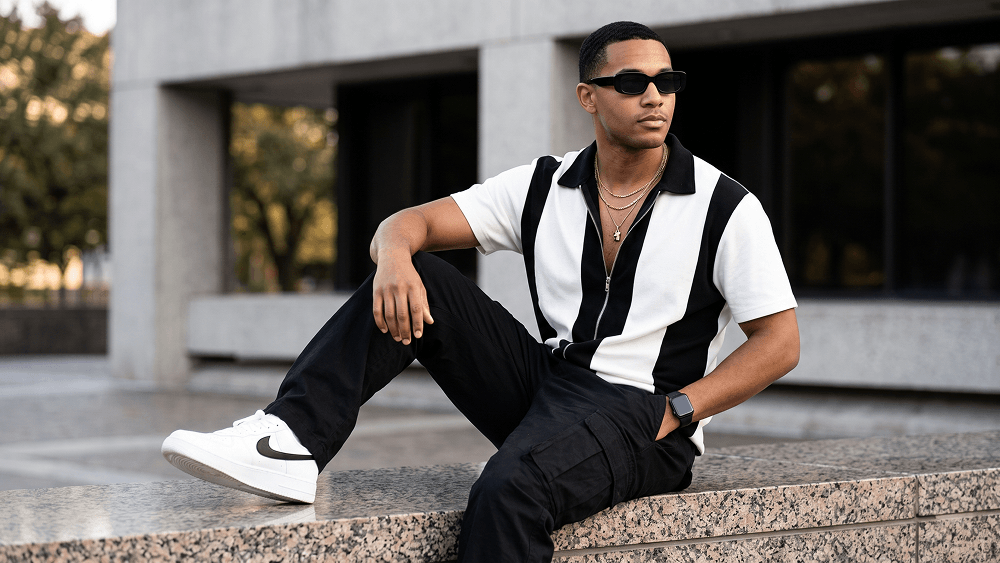
Use the uploaded image strictly as the face and identity reference. Preserve the subject’s facial structure, skin tone, hairstyle, facial hair, and natural proportions accurately. Do not beautify, reshape, or alter the face. Create an ultra-photorealistic full-body fashion editorial portrait of a stylish man seated casually on the polished granite ledge of a modern city building. He wears sleek black rectangular sunglasses and looks off-camera to the right with a calm, confident, thoughtful expression. Dress him in a relaxed short-sleeve zip-up shirt with a bold black-and-white color-block design, a black collar, and a partially unzipped front revealing layered gold chain necklaces and a minimal pendant. Pair it with loose black cargo trousers with oversized utility pockets, clean white sneakers with black swoosh detailing, and a black smartwatch on his left wrist. Pose him diagonally across the frame with one leg extended forward and the other bent comfortably on the ledge. One hand rests naturally in his trouser pocket, while the other rests on his bent knee. Set the scene in a modern urban environment with clean concrete walls, dark window panels, and softly blurred green trees in the background. Add subtle out-of-focus greenery in the foreground for depth. Use soft late-afternoon natural daylight with even flattering illumination, gentle highlights, realistic contrast, and a premium cinematic feel. Shot at eye level with an 85mm lens at f/2.0, shallow depth of field, DSLR-quality detail, crisp subject separation, realistic skin texture, detailed fabric, and professional editorial color grading. Negative prompt: wrong identity, distorted face, extra limbs, bad anatomy, warped pose, blurry subject, cartoon, anime, CGI, plastic skin, text, logo, watermark. Do not place any text or website inside the image. Prompt credit: (http://www.prompteg.com) — external only, do not render it in the image. Aspect ratio: 4:5.
Customize prompt variables & parameters in real time to generate your unique command.
How to Use This Prompt
Quick guide to generating image with this prompt in Gemini and other AI generators.
Click the "Copy" button above to save the exact prompt text to your clipboard.
Launch Gemini or your preferred AI image generator interface.
Paste the prompt into the input bar, add optional aspect ratio parameters (e.g. --ar 16:9), and generate.
Looking for a high realism, hyper realistic cinematic prompt for your AI art generator? The AI Prompt for Creating a Realistic Male Fashion Portrait with a Cityscape AI prompt is specifically engineered for Gemini to achieve high-resolution photorealistic image synthesis. By leveraging precise artistic cues, lighting parameters, and aspect ratio controls, this prompt yields cinematic visual outputs suitable for commercial art, concept design, and digital portfolios.
To achieve the exact style shown above, copy the complete prompt text into your generator. You can use our Prompt Customizer above to tweak lighting, visual styles, or adjust aspect ratios (`--ar 16:9` for widescreen landscape or `--ar 9:16` for mobile stories).
Related Images



Remove Watermarks from Gemini Images Instantly
Clean visible watermarks added by Google Gemini & Imagen 3 with zero quality loss in seconds.
