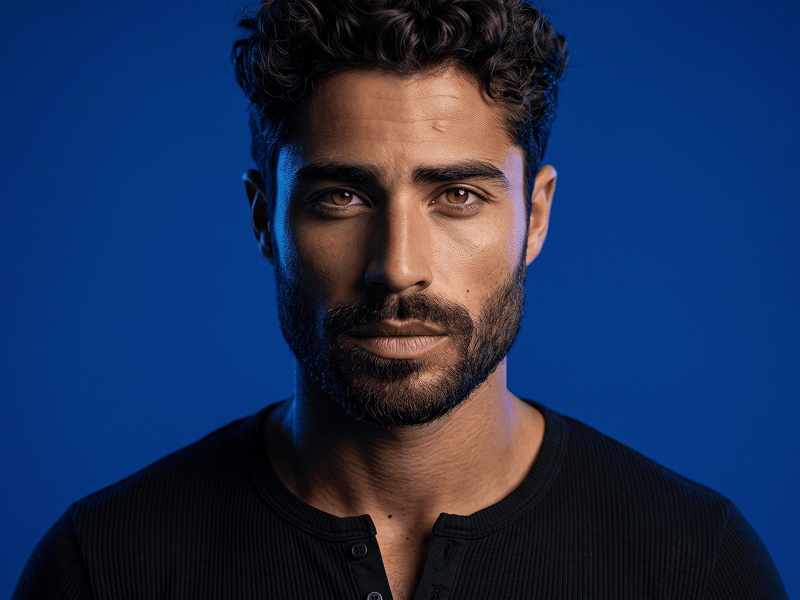
企业商务摄影棚男性人像 Prompt - Gemini Prompt
zoom_in 全屏

企业商务摄影棚男性人像 Prompt

分类 人像
AI工具 / 生成器 Gemini
浏览 / 点赞 48 / 0
提示词

Create a high-resolution professional studio portrait featuring the exact face of the user from the uploaded reference photo. Identity Preservation — STRICT: Keep the face 100% identical to the uploaded image. Preserve the exact facial features, facial proportions, skin tone, hairstyle, hairline, beard shape, age, and wide, genuine, teeth-showing smile. No face alteration, beautification, age change, or identity drift. Composition: Create a precise head-and-shoulders corporate portrait. The subject faces the camera directly with an upright, confident posture. Use centered, balanced framing. Outfit: The subject is wearing a precisely tailored charcoal-grey textured wool suit jacket, a clean white button-down collar shirt, and a solid textured navy-blue tie. Subtle Brand Detail: Integrate the word “Prompteg” as an extremely small, refined, tone-on-tone embroidered signature along the inner edge of the left blazer lapel. The branding must not appear as a badge, patch, name tag, metal accessory, large logo, printed graphic, or separate object. It should look like a discreet luxury tailoring detail stitched directly into the lapel seam. Use dark charcoal-grey thread that is only slightly different from the blazer fabric. Keep it understated, elegant, and naturally integrated into the wool texture, stitching, folds, perspective, shadows, and lighting. It must not attract attention away from the face or reduce the professional quality of the portrait. The embroidery must contain only the exact word: Prompteg Exact spelling: P-r-o-m-p-t-e-g. Use one uppercase “P” followed by lowercase letters. Do not replace, omit, duplicate, merge, mirror, reverse, or invent any characters. CRITICAL FALLBACK: If the exact word “Prompteg” cannot be rendered correctly, omit the branding completely and leave the blazer plain. Never generate misspelled, distorted, random, or unreadable text. Background: Use a plain, neutral light-grey studio background that is completely clean, seamless, uniform, and free from distractions. Lighting: Use soft, even, flattering professional studio lighting. Preserve natural skin tones and create gentle shadows that define the facial structure. Show realistic detail in the hair, beard, wool suit, cotton shirt, and textured tie. Quality: Sharp focus on the face, eyes, smile, beard, and clothing. Realistic skin texture, accurate anatomy, premium corporate portrait photography, cinematic clarity, high dynamic range, detailed fabric textures, and crisp 8K resolution. Negative Prompt: badge, name tag, metal plate, lapel pin, patch, oversized logo, prominent branding, text on tie, text on shirt, text on background, floating text, digital overlay, incorrect spelling, promptsg, promteg, promptek, promptegg, random letters, gibberish text, unreadable text, mirrored text, reversed text, missing letters, extra letters, duplicated text, watermark, caption, face alteration, wrong identity, different expression, plastic skin, over-smoothed skin, blurry face, low detail, noise, pixelation

去除 Gemini 水印
去除水印
交互式提示词定制器

实时自定义提示词变量与参数,生成您的专属指令。

🎨 视觉风格
💡 光影与氛围
📐 宽高比

如何使用此提示词

在 Gemini 及其他 AI 生成器中使用此提示词生成图像的快速指南。

1 复制提示词

点击上方的“复制”按钮将完整提示词保存到剪贴板。

2 打开 Gemini

启动 Gemini 或您首选的 AI 图像生成器。

3 粘贴并生成

将提示词粘贴到输入框中,添加可选的宽高比参数(例如 --ar 16:9),然后生成。

小贴士: 您可以调整光影或风格关键词(例如“cinematic lighting”)以定制符合您概念的效果。

寻找适用于 AI 艺术生成器的超写实电影级提示词?企业商务摄影棚男性人像 Prompt AI 提示词专为 Gemini 优化设计,精准调控光影与宽高比。

🤖 AI 模型兼容性矩阵
Gemini Imagen 3
100% 完全兼容
Midjourney v6
19% 低度匹配
DALL-E 3
10% 低度匹配
FLUX.1 / SDXL
17% 低度匹配
目标 AI 引擎 Gemini
分类与风格 人像

要实现如上所示的完全相同风格,请复制完整的提示词文本。您可以使用上方的 提示词定制器 来调整光影、视觉风格或修改宽高比(例如横屏 `--ar 16:9` 或手机竖屏 `--ar 9:16`)。

相关图像

查看全部
免费 AI 水印工具

一键去除 Gemini 图片 高清水印

轻松清除 Google Gemini & Imagen 3 生成图片中的水印,无损高清画质。

立即免费去除水印 100% Free · Unlimited