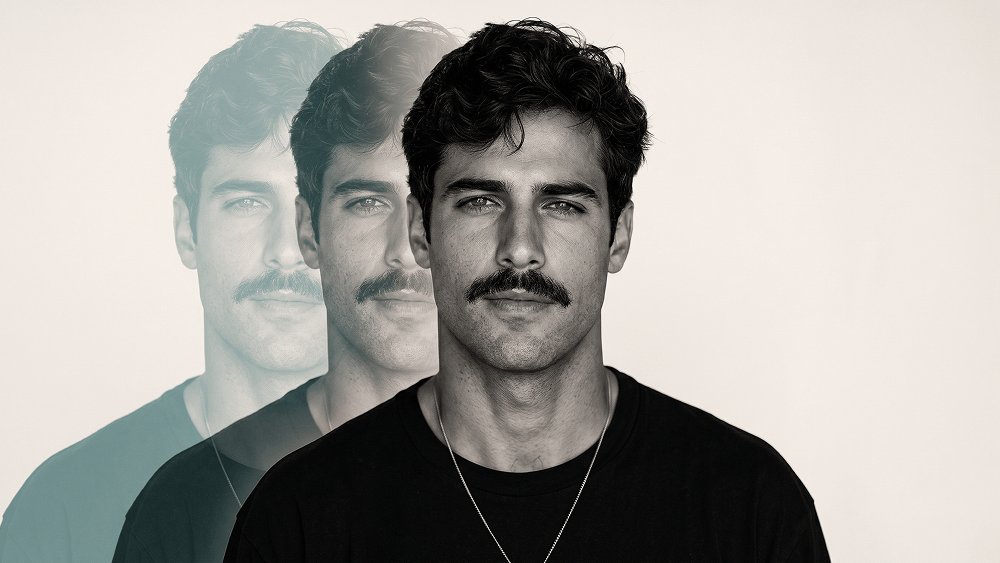
带有青绿色动态光轨的编辑风多重曝光肖像提示词
Using my uploaded personal photo as the identity and facial reference, recreate the visual style and composition of the other uploaded reference image. The person in the final image must clearly be me, not the person from the reference image. Preserve my real facial identity with very high accuracy: my face shape, jawline, cheekbones, eyes, eyebrows, nose, lips, ears, skin characteristics, natural asymmetries, hairline, hairstyle, hair texture, and overall proportions should closely match my uploaded photo. Use the reference image only for the photography style, pose, framing, clothing, lighting, composition, and overall mood. Create a highly realistic, editorial-quality studio portrait with the following characteristics: Close-up / chest-up portrait, photographed straight-on at approximately eye level. Subject centered in the frame, facing directly toward the camera. Calm, confident, serious facial expression with relaxed lips. Natural posture with squared shoulders. Black oversized crew-neck T-shirt, matching the simple minimalist outfit in the reference. Thin, understated silver necklace with a small subtle pendant. Neutral warm off-white / light beige studio background. Soft but directional studio lighting from the front and slightly above, sculpting the face naturally. Strong facial definition with realistic shadows around the cheekbones, jawline, nose, eyes, and neck. High-end fashion editorial / professional model test photography aesthetic. Mostly monochromatic, desaturated black-and-white treatment with very subtle warm tones in the background. Extremely detailed natural skin: visible pores, fine facial texture, tiny imperfections, subtle under-eye texture, realistic facial hair if present in my source photo. Do NOT overly smooth or beautify the skin. Realistic individual hair strands, natural flyaway hairs, authentic hair volume and texture based specifically on my uploaded photo. Sharp focus on the eyes and face. Professional full-frame camera look, approximately an 85mm portrait lens. Shallow but subtle depth of field. High dynamic range with detailed highlights and deep blacks. Fine photographic grain for a premium magazine/editorial feel. Photorealistic lighting and physically believable anatomy. Behind me, create three progressively offset translucent duplicate silhouettes of my own portrait, extending toward the left side of the frame, similar to a multiple-exposure / motion-trail effect. The duplicate portraits should: Be based on my own face and body, not the reference person's. Maintain the same general pose. Be partially transparent. Gradually fade as they move farther left. Have a subtle muted teal / turquoise tint. Slightly overlap one another. Feel like a sophisticated analog multiple-exposure photography effect rather than obvious digital copies. Remain softer and less detailed than the main portrait so that the primary face stays dominant. Keep the main portrait crisp, highly detailed, dimensional, and realistic. IMPORTANT: Do not copy the identity, facial features, hairstyle, or exact appearance of the model in the style-reference image. Replace all identity-specific characteristics with those from my personal reference photo. Do not alter my ethnicity, apparent age, facial proportions, eye shape, nose shape, jaw structure, or other recognizable identity features. Do not make me look like a generic fashion model or artificially “more handsome.” The goal is an accurate, recognizable, photorealistic version of me photographed in this exact visual style. No typography. No letters. No logos. No brand names. No captions. No graphic-design text. No UI elements. No carousel indicators. No arrows. No watermarks. No borders. The final result should look like a real high-budget fashion editorial portrait photographed in a professional studio, not AI-generated, not illustrated, not CGI, and not overly retouched. Prompt credit: www.prompteg.com — external only, do not render it in the image.
实时自定义提示词变量与参数,生成您的专属指令。
如何使用此提示词
在 Gemini 及其他 AI 生成器中使用此提示词生成图像的快速指南。
点击上方的“复制”按钮将完整提示词保存到剪贴板。
启动 Gemini 或您首选的 AI 图像生成器。
将提示词粘贴到输入框中,添加可选的宽高比参数(例如 --ar 16:9),然后生成。
寻找适用于 AI 艺术生成器的超写实电影级提示词?带有青绿色动态光轨的编辑风多重曝光肖像提示词 AI 提示词专为 Gemini 优化设计,精准调控光影与宽高比。
要实现如上所示的完全相同风格,请复制完整的提示词文本。您可以使用上方的 提示词定制器 来调整光影、视觉风格或修改宽高比(例如横屏 `--ar 16:9` 或手机竖屏 `--ar 9:16`)。
相关图像


一键去除 Gemini 图片 高清水印
轻松清除 Google Gemini & Imagen 3 生成图片中的水印,无损高清画质。
