Prompt zum Platzieren eines Website-Mockups auf einem Smartphone-Bildschirm - Gemini Prompt
zoom_in Vollbild

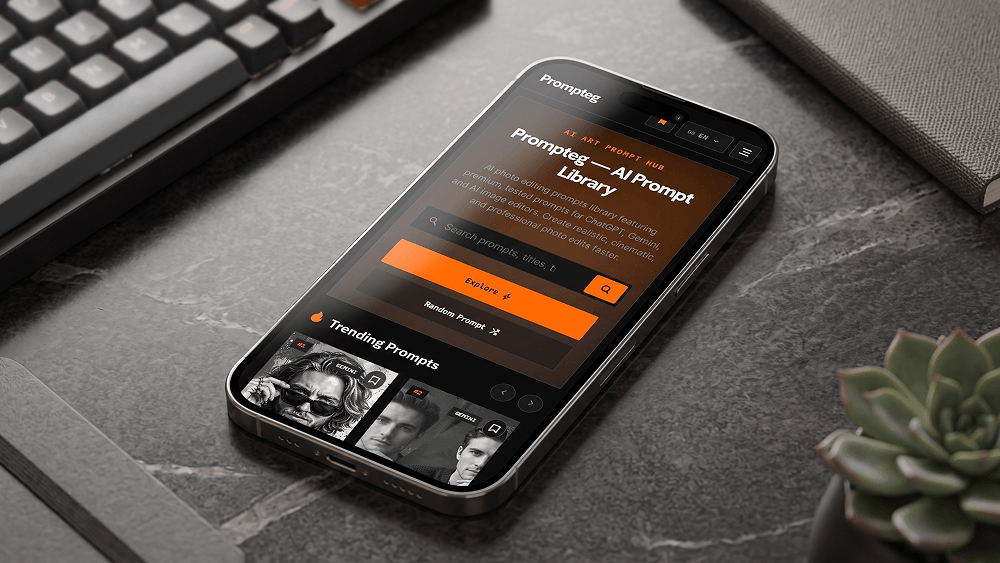
Prompt zum Platzieren eines Website-Mockups auf einem Smartphone-Bildschirm

Kategorie Werkzeuge
KI-Tool / Generator Gemini
Aufrufe / Gefällt mir 5 / 0
Prompt

Use the uploaded website screenshot as the exact visual content that must appear on the smartphone screen. Create an ultra-realistic professional smartphone mockup photograph. Place the uploaded website screenshot naturally and accurately inside the phone's display, preserving the original website design, layout, typography, colors, spacing, proportions, icons, images and interface elements without redesigning, modifying, simplifying or replacing them. The smartphone must look like a real premium modern device with realistic glass reflections, subtle screen glare, accurate bezels, realistic metal edges and physically accurate materials. Use a professional commercial product photography setup with cinematic but natural lighting, realistic shadows, subtle reflections and a clean premium environment. The phone should be positioned at a visually appealing perspective while keeping the screen clearly visible and readable. Do not distort, crop, stretch, reinterpret or regenerate the website interface. Do not alter any element of the uploaded screenshot. The uploaded screenshot is the absolute source of truth for everything displayed on the smartphone screen. Make the final image look like a professionally photographed real smartphone mockup, not a 3D render, illustration, digital artwork or graphic design. The prompt may reference "prompteg.com" internally as the source or brand context, but this text must NEVER appear in the generated image. The final image must contain no visible "prompteg.com" text, logo, watermark, brand name, signature or any other artificial branding anywhere in the composition, unless such content already exists inside the uploaded website screenshot itself. Ultra-realistic photography, authentic materials, realistic glass reflections, natural lighting, physically accurate shadows, realistic depth of field, precise details, premium commercial advertising quality.

Gemini-Wasserzeichen entfernen
Entfernen
Interaktiver Prompt-Anpasser

Passen Sie Prompt-Variablen in Echtzeit an, um Ihren eigenen Befehl zu erstellen.

🎨 Visueller Stil
💡 Beleuchtung & Stimmung
📐 Seitenverhältnis

Wie man diesen Prompt verwendet

Kurzanleitung zur Bildgenerierung mit diesem Prompt in Gemini und anderen KI-Generatoren.

1 Prompt kopieren

Klicken Sie oben auf "Kopieren", um den Prompt-Text in Ihre Zwischenablage zu speichern.

2 Gemini öffnen

Öffnen Sie Gemini oder Ihren bevorzugten KI-Bildgenerator.

3 Einfügen & Generieren

Fügen Sie den Prompt ein, fügen Sie optionale Parameter hinzu (z. B. --ar 16:9) und starten Sie die Generierung.

Profi-Tipp: Passen Sie Beleuchtung oder Stilwörter an (z. B. "cinematic lighting"), um das Ergebnis zu personalisieren.

Suchen Sie nach einem hochrealistischen kinematografischen KI-Prompt? Der Prompt zum Platzieren eines Website-Mockups auf einem Smartphone-Bildschirm KI-Prompt wurde speziell für Gemini entwickelt, um hochauflösende fotorealistische Bildsynthesen zu erzielen.

🤖 KI-Modell-Kompatibilitätsmatrix
Gemini Imagen 3
100% Kompatibel
Midjourney v6
7% Niedrige Übereinstimmung
DALL-E 3
14% Niedrige Übereinstimmung
FLUX.1 / SDXL
5% Niedrige Übereinstimmung
Ziel-KI-Engine Gemini
Kategorie & Stil Werkzeuge

Um den oben gezeigten Stil zu erzielen, kopieren Sie den vollständigen Prompt-Text. Verwenden Sie unseren Prompt-Anpasser oben, um Beleuchtung, Stile und Seitenverhältnisse (`--ar 16:9`) anzupassen.

Ähnliche Bilder

ALLE ANZEIGEN
KOSTENLOSES KI-TOOL

Wasserzeichen aus Gemini-Bildern Sofort Entfernen

Entfernen Sie Google Gemini & Imagen 3 Wasserzeichen in Sekundenschnelle ohne Qualitätsverlust.

WASSERZEICHEN ENTFERNEN 100% Free · Unlimited