Place a Website Mockup on a Phone Screen Prompt
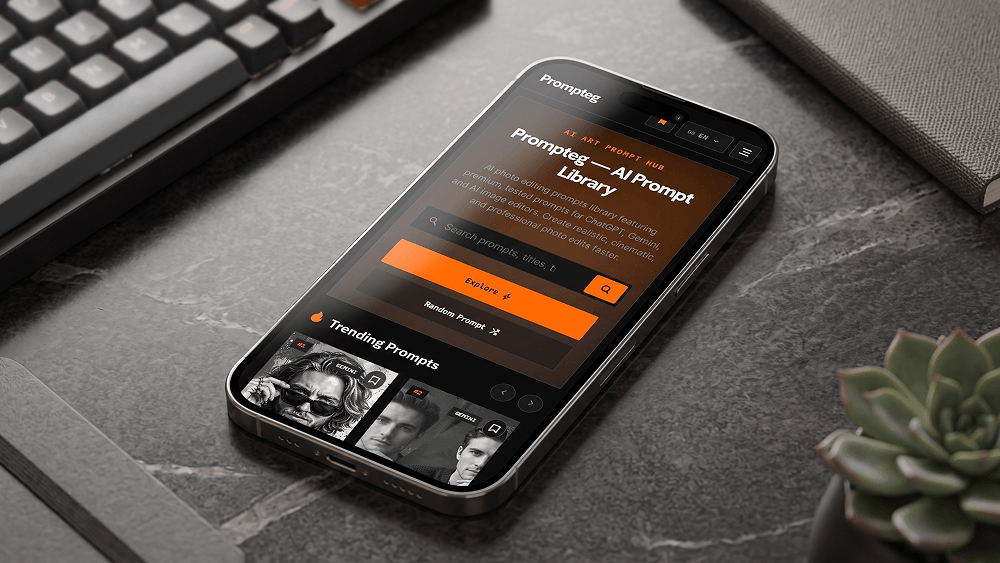
Use the uploaded website screenshot as the exact visual content that must appear on the smartphone screen. Create an ultra-realistic professional smartphone mockup photograph. Place the uploaded website screenshot naturally and accurately inside the phone's display, preserving the original website design, layout, typography, colors, spacing, proportions, icons, images and interface elements without redesigning, modifying, simplifying or replacing them. The smartphone must look like a real premium modern device with realistic glass reflections, subtle screen glare, accurate bezels, realistic metal edges and physically accurate materials. Use a professional commercial product photography setup with cinematic but natural lighting, realistic shadows, subtle reflections and a clean premium environment. The phone should be positioned at a visually appealing perspective while keeping the screen clearly visible and readable. Do not distort, crop, stretch, reinterpret or regenerate the website interface. Do not alter any element of the uploaded screenshot. The uploaded screenshot is the absolute source of truth for everything displayed on the smartphone screen. Make the final image look like a professionally photographed real smartphone mockup, not a 3D render, illustration, digital artwork or graphic design. The prompt may reference "prompteg.com" internally as the source or brand context, but this text must NEVER appear in the generated image. The final image must contain no visible "prompteg.com" text, logo, watermark, brand name, signature or any other artificial branding anywhere in the composition, unless such content already exists inside the uploaded website screenshot itself. Ultra-realistic photography, authentic materials, realistic glass reflections, natural lighting, physically accurate shadows, realistic depth of field, precise details, premium commercial advertising quality.
Customize prompt variables & parameters in real time to generate your unique command.
How to Use This Prompt
Quick guide to generating image with this prompt in Gemini and other AI generators.
Click the "Copy" button above to save the exact prompt text to your clipboard.
Launch Gemini or your preferred AI image generator interface.
Paste the prompt into the input bar, add optional aspect ratio parameters (e.g. --ar 16:9), and generate.
Looking for a high realism, hyper realistic cinematic prompt for your AI art generator? The Place a Website Mockup on a Phone Screen Prompt AI prompt is specifically engineered for Gemini to achieve high-resolution photorealistic image synthesis. By leveraging precise artistic cues, lighting parameters, and aspect ratio controls, this prompt yields cinematic visual outputs suitable for commercial art, concept design, and digital portfolios.
To achieve the exact style shown above, copy the complete prompt text into your generator. You can use our Prompt Customizer above to tweak lighting, visual styles, or adjust aspect ratios (`--ar 16:9` for widescreen landscape or `--ar 9:16` for mobile stories).
Related Images
Remove Watermarks from Gemini Images Instantly
Clean visible watermarks added by Google Gemini & Imagen 3 with zero quality loss in seconds.