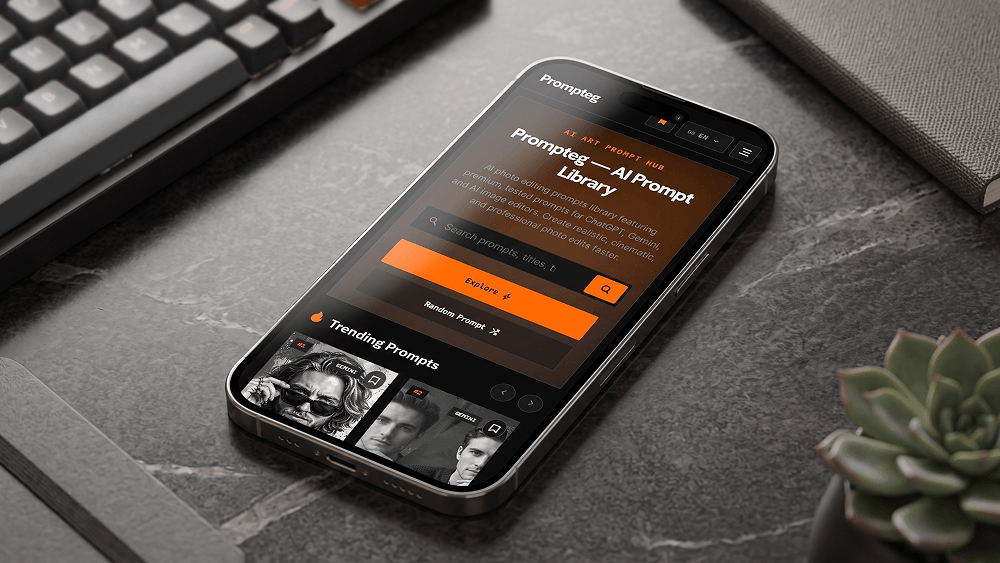
将网站 Mockup 放置在手机屏幕上的 Prompt
Use the uploaded website screenshot as the exact visual content that must appear on the smartphone screen. Create an ultra-realistic professional smartphone mockup photograph. Place the uploaded website screenshot naturally and accurately inside the phone's display, preserving the original website design, layout, typography, colors, spacing, proportions, icons, images and interface elements without redesigning, modifying, simplifying or replacing them. The smartphone must look like a real premium modern device with realistic glass reflections, subtle screen glare, accurate bezels, realistic metal edges and physically accurate materials. Use a professional commercial product photography setup with cinematic but natural lighting, realistic shadows, subtle reflections and a clean premium environment. The phone should be positioned at a visually appealing perspective while keeping the screen clearly visible and readable. Do not distort, crop, stretch, reinterpret or regenerate the website interface. Do not alter any element of the uploaded screenshot. The uploaded screenshot is the absolute source of truth for everything displayed on the smartphone screen. Make the final image look like a professionally photographed real smartphone mockup, not a 3D render, illustration, digital artwork or graphic design. The prompt may reference "prompteg.com" internally as the source or brand context, but this text must NEVER appear in the generated image. The final image must contain no visible "prompteg.com" text, logo, watermark, brand name, signature or any other artificial branding anywhere in the composition, unless such content already exists inside the uploaded website screenshot itself. Ultra-realistic photography, authentic materials, realistic glass reflections, natural lighting, physically accurate shadows, realistic depth of field, precise details, premium commercial advertising quality.
实时自定义提示词变量与参数,生成您的专属指令。
如何使用此提示词
在 Gemini 及其他 AI 生成器中使用此提示词生成图像的快速指南。
点击上方的“复制”按钮将完整提示词保存到剪贴板。
启动 Gemini 或您首选的 AI 图像生成器。
将提示词粘贴到输入框中,添加可选的宽高比参数(例如 --ar 16:9),然后生成。
寻找适用于 AI 艺术生成器的超写实电影级提示词?将网站 Mockup 放置在手机屏幕上的 Prompt AI 提示词专为 Gemini 优化设计,精准调控光影与宽高比。
要实现如上所示的完全相同风格,请复制完整的提示词文本。您可以使用上方的 提示词定制器 来调整光影、视觉风格或修改宽高比(例如横屏 `--ar 16:9` 或手机竖屏 `--ar 9:16`)。
相关图像




一键去除 Gemini 图片 高清水印
轻松清除 Google Gemini & Imagen 3 生成图片中的水印,无损高清画质。
