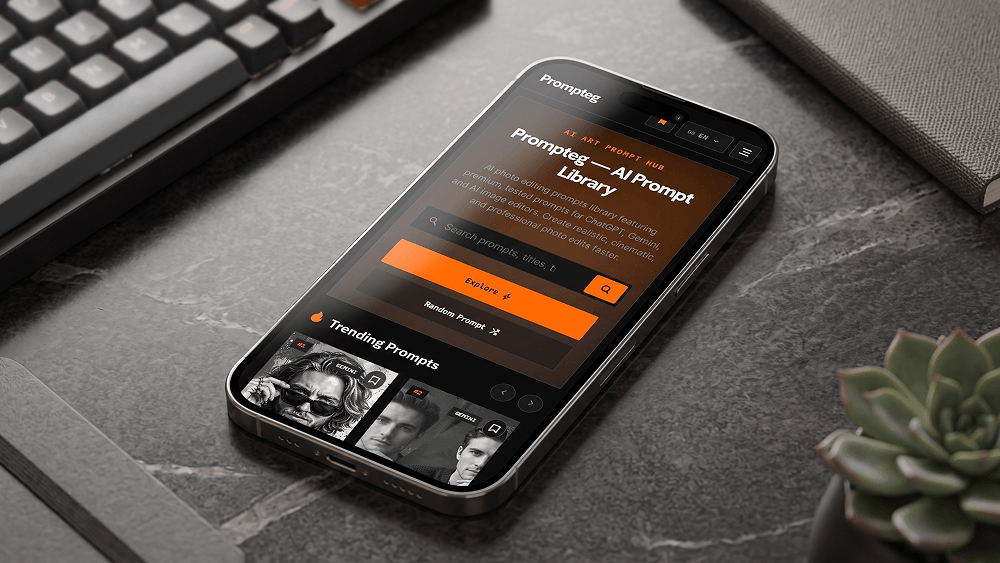
Telefon Ekranına Web Sitesi Mockup'ı Yerleştirme Promptu
Use the uploaded website screenshot as the exact visual content that must appear on the smartphone screen. Create an ultra-realistic professional smartphone mockup photograph. Place the uploaded website screenshot naturally and accurately inside the phone's display, preserving the original website design, layout, typography, colors, spacing, proportions, icons, images and interface elements without redesigning, modifying, simplifying or replacing them. The smartphone must look like a real premium modern device with realistic glass reflections, subtle screen glare, accurate bezels, realistic metal edges and physically accurate materials. Use a professional commercial product photography setup with cinematic but natural lighting, realistic shadows, subtle reflections and a clean premium environment. The phone should be positioned at a visually appealing perspective while keeping the screen clearly visible and readable. Do not distort, crop, stretch, reinterpret or regenerate the website interface. Do not alter any element of the uploaded screenshot. The uploaded screenshot is the absolute source of truth for everything displayed on the smartphone screen. Make the final image look like a professionally photographed real smartphone mockup, not a 3D render, illustration, digital artwork or graphic design. The prompt may reference "prompteg.com" internally as the source or brand context, but this text must NEVER appear in the generated image. The final image must contain no visible "prompteg.com" text, logo, watermark, brand name, signature or any other artificial branding anywhere in the composition, unless such content already exists inside the uploaded website screenshot itself. Ultra-realistic photography, authentic materials, realistic glass reflections, natural lighting, physically accurate shadows, realistic depth of field, precise details, premium commercial advertising quality.
Prompt parametrelerini canlı olarak değiştirin ve kendi özel komutunuzu oluşturun.
Bu Prompt Nasıl Kullanılır?
Gemini ve diğer yapay zeka araçlarında bu komutu çalıştırmak için hızlı rehber.
Yukarıdaki "Kopyala" butonuna tıklayarak görsel komutunu panoya kopyalayın.
Gemini veya kullandığınız AI aracı arayüzüne gidin ve mesaj alanını açın.
Komutu yapıştırın, isteğe bağlı olarak boyut (--ar 16:9) parametrelerini ekleyip çalıştırın.
Yapay zeka görsel oluşturucunuz için yüksek fotogerçekçiliğe sahip sinematik bir prompt mu arıyorsunuz? Telefon Ekranına Web Sitesi Mockup'ı Yerleştirme Promptu yapay zeka promptu, Gemini motorlarında yüksek çözünürlüklü görsel sentezi elde etmek için özel olarak optimize edilmiştir. Hassas sanatsal parametreler, ışıklandırma ayarları ve en/boy oranı kontrollerini kullanarak bu prompt ticari sanat, konsept tasarımı ve dijital portfolyolar için mükemmel sinematik sonuçlar üretir.
Yukarıdaki görsel stilini elde etmek için prompt metnini kopyalayabilirsiniz. Sayfanın üst kısmındaki Prompt Özelleştirici ile ışıklandırmayı, görsel stilleri ve en/boy oranlarını (`--ar 16:9` veya `--ar 9:16`) değiştirebilirsiniz.
İlgili Görseller




Gemini Görsellerinden Filigranı Tek Tıkla Kaldırın
Google Gemini & Imagen 3 filigranlarını sıfır kalite kaybıyla saniyeler içinde temizleyin.
