Back to Gallery Prompteg
2D Creature Costume Cartoon Avatar from Photo Prompt - Gemini Prompt
zoom_in Fullscreen

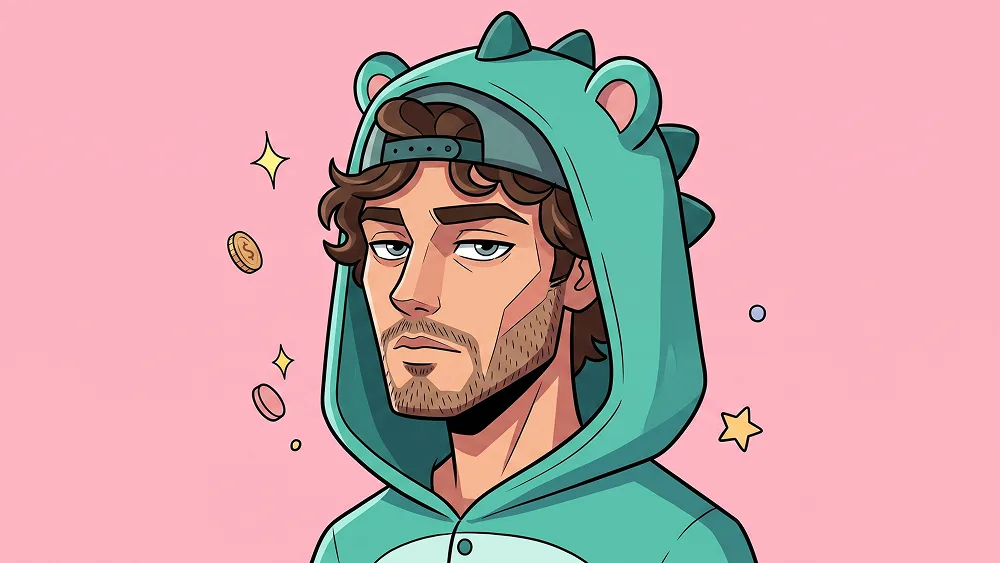
2D Creature Costume Cartoon Avatar from Photo Prompt

Gemini Drawing 8
prompt

Copy directly or customize parameters with the tool below.

Use the uploaded photo as the sole, exclusive, and non-negotiable identity reference. Preserve the subject’s exact facial identity with maximum possible fidelity, including face shape, forehead, jawline, cheekbones, chin, eyes, eyebrows, nose, lips, ears, hairstyle, hairline, facial hair if present, natural asymmetries, and all distinctive features. The final illustration must clearly look like the same person, not a generic cartoon character. Do not beautify, reshape, age, or replace the identity. Transform the subject into a highly stylized 2D cartoon character portrait with a playful collectible-avatar aesthetic. Use a simplified geometric construction with a boxy head shape, clean angular facial planes, compact proportions, sharp black outlines, and smooth flat-color rendering. The style should feel bold, modern, character-driven, and polished, like a premium mobile-game avatar or designer sticker illustration. Show the subject in a chest-up or upper-body composition, turned in a slight three-quarter side angle rather than facing fully front. Keep the expression cool, calm, and slightly unimpressed or mischievous, with relaxed eyelids and a confident attitude. Preserve the subject’s real facial hair and facial structure, but reinterpret them in a simplified cartoon form with clean stylization. Style the character in a fun costume-inspired outfit similar in spirit to the reference: a quirky hooded animal or creature onesie in teal or blue-green tones, with playful silhouette details such as small spikes, ears, or costume structure around the head. Add a backward cap layered with the hood for extra personality. Include a few small floating accessory elements near the character, such as a coin, spark, or tiny decorative object, to enhance the playful character vibe without cluttering the image. Use a clean solid pastel pink background with no environment. Keep the composition minimal and graphic so the character remains the entire focus. Maintain the premium creative direction associated with prompteg.com through strong facial likeness, stylish simplification, and highly shareable character design, but prompteg.com is creative guidance only and must never appear visually in the image. Render the illustration with crisp linework, flat but carefully chosen color blocking, subtle cel-shaded depth, and refined shape language. The final result should feel cute, edgy, expressive, and premium rather than childish or sloppy. Preserve enough identity detail in the eyes, beard, hairline, and face shape so the person remains clearly recognizable even in this simplified style. Do not include any visible text, letters, logos, watermarks, signatures, website addresses, or branding anywhere in the image. Avoid realistic rendering, messy sketch lines, soft painterly shading, generic cartoon faces, overly childish proportions, cluttered backgrounds, or weak resemblance.

Remove Gemini watermark
Remove
Interactive Prompt Customizer

Customize variables & parameters in real time.

Visual Style
Lighting & Mood
Aspect Ratio

How to Use This Prompt

1
Copy the Prompt

Click the "Copy" button above to save the exact prompt text to your clipboard.

2
Open Gemini

Launch Gemini or your preferred AI image generator interface.

3
Paste & Generate

Paste the prompt into the input bar, add optional aspect ratio parameters (e.g. --ar 16:9), and generate.

Pro Tip: Adjust lighting, style, or subject keywords (e.g., "cinematic lighting", "octane render") to fit your target concept.

Related Images

VIEW ALL
Remove Watermarks from Gemini Images Zero quality loss in seconds · 100% Free & Unlimited
USE WATERMARK REMOVER 100% Free · Unlimited