
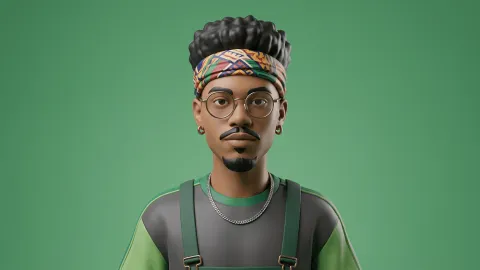
AI Prompt to Transform Your Photo into a Personalized 3D Character
A masterpiece quality, detailed 3D animated character portrait, based directly on the facial structure and likeness of the subject in photo. The character is rendered in the iconic Disney Pixar animation style. He has the exact same hair color and texture as the reference image, styled my photo. His facial features—specifically the eyes, nose, and mouth contours—maintain a strong resemblance to the person in the photo, with a warm, authentic, closed-mouth smile. He is wearing the same from the reference. Soft, diffused cinematic lighting captures detailed skin and fabric textures. Focus is sharp on the face with a shallow depth of field. Background is a clean, neutral white studio setting, optimized for high searchability with keywords like 'custom 3D portrait', 'personalized avatar', 'AI character from photo', 'authentic facial similarity'." Prompt credit: www.prompteg.com — external only, do not render it in the image.
Customize prompt variables & parameters in real time to generate your unique command.
How to Use This Prompt
Quick guide to generating image with this prompt in Gemini and other AI generators.
Click the "Copy" button above to save the exact prompt text to your clipboard.
Launch Gemini or your preferred AI image generator interface.
Paste the prompt into the input bar, add optional aspect ratio parameters (e.g. --ar 16:9), and generate.
Looking for a high realism, hyper realistic cinematic prompt for your AI art generator? The AI Prompt to Transform Your Photo into a Personalized 3D Character AI prompt is specifically engineered for Gemini to achieve high-resolution photorealistic image synthesis. By leveraging precise artistic cues, lighting parameters, and aspect ratio controls, this prompt yields cinematic visual outputs suitable for commercial art, concept design, and digital portfolios.
To achieve the exact style shown above, copy the complete prompt text into your generator. You can use our Prompt Customizer above to tweak lighting, visual styles, or adjust aspect ratios (`--ar 16:9` for widescreen landscape or `--ar 9:16` for mobile stories).
Related Images




Remove Watermarks from Gemini Images Instantly
Clean visible watermarks added by Google Gemini & Imagen 3 with zero quality loss in seconds.
