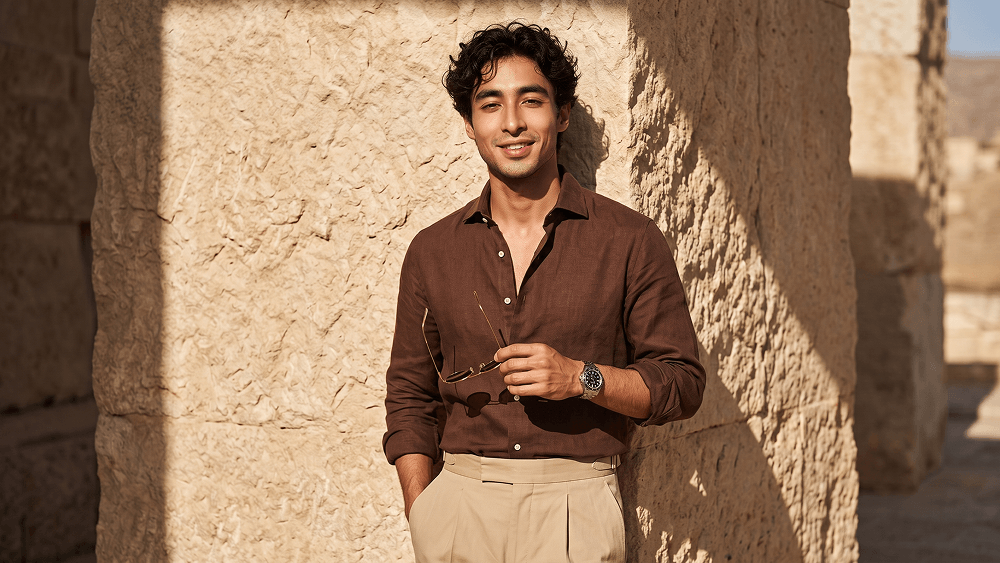
AI Prompt for Creating a Professional Fashion Photoshoot - Gemini Prompt
zoom_in Fullscreen

AI Prompt for Creating a Professional Fashion Photoshoot

Category Realistic
AI Tool / Generator Gemini
Views / Likes 20 / 0
Prompt

Create a hyper-realistic fashion editorial portrait of a handsome man in a vertical 4:5 frame. He is wearing a rich chocolate-brown tailored linen button-down shirt, slightly unbuttoned at the chest with sleeves rolled to the mid-forearms, paired with high-waisted beige pleated trousers with a clean beltless waistband. Add a silver luxury wristwatch with a dark dial on his left wrist, and thin gold-framed aviator sunglasses held in his right hand. He stands relaxed against a heavily textured beige natural stone wall, slightly leaning back with an upright posture. One hand is inside his trouser pocket, and the other holds the sunglasses near chest level. He looks directly at the camera with a warm, confident smile. Use strong early afternoon sunlight coming from the front upper-right, casting sharp diagonal shadows across the wall and body. Keep the lighting warm, high-contrast, and cinematic, with subtle bounce light preserving facial detail. Shot at eye level with a Sony A1-style full-frame camera, 85mm lens, f/1.8, ISO 100, 1/200. Keep sharp focus on the face, clothing, and nearby wall texture, with subtle depth of field. Ultra-realistic skin texture, detailed fabric, professional color grading, premium editorial quality. Negative prompt: cartoon, anime, CGI, plastic skin, bad anatomy, extra fingers, distorted face, blurry subject, low detail, flat lighting, oversaturated colors, text, logo, watermark. Do not place any text or website inside the image. Prompt credit: (http://www.prompteg.com) — external only, do not render it in the image.

Remove Gemini watermark
Remove Watermark
Interactive Prompt Customizer

Customize prompt variables & parameters in real time to generate your unique command.

🎨 Visual Style
💡 Lighting & Mood
📐 Aspect Ratio

How to Use This Prompt

Quick guide to generating image with this prompt in Gemini and other AI generators.

1 Copy the Prompt

Click the "Copy" button above to save the exact prompt text to your clipboard.

2 Open Gemini

Launch Gemini or your preferred AI image generator interface.

3 Paste & Generate

Paste the prompt into the input bar, add optional aspect ratio parameters (e.g. --ar 16:9), and generate.

Pro Tip: Adjust lighting, style, or subject keywords (e.g., "cinematic lighting", "octane render") to fit your target concept.

Looking for a high realism, hyper realistic cinematic prompt for your AI art generator? The AI Prompt for Creating a Professional Fashion Photoshoot AI prompt is specifically engineered for Gemini to achieve high-resolution photorealistic image synthesis. By leveraging precise artistic cues, lighting parameters, and aspect ratio controls, this prompt yields cinematic visual outputs suitable for commercial art, concept design, and digital portfolios.

🤖 AI Model Compatibility Matrix
Gemini Imagen 3
100% Compatible
Midjourney v6
17% Low Match
DALL-E 3
8% Low Match
FLUX.1 / SDXL
15% Low Match
Target AI Engine Gemini
Category & Style Realistic

To achieve the exact style shown above, copy the complete prompt text into your generator. You can use our Prompt Customizer above to tweak lighting, visual styles, or adjust aspect ratios (`--ar 16:9` for widescreen landscape or `--ar 9:16` for mobile stories).

Related Images

VIEW ALL
FREE AI WATERMARK TOOL

Remove Watermarks from Gemini Images Instantly

Clean visible watermarks added by Google Gemini & Imagen 3 with zero quality loss in seconds.

USE WATERMARK REMOVER 100% Free · Unlimited