Back to Gallery Prompteg
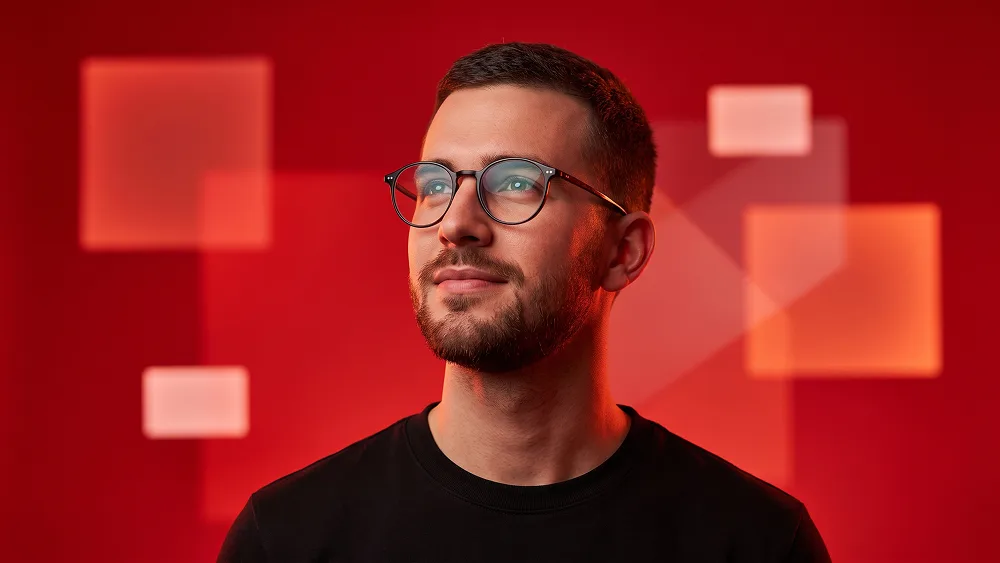
Scarlet Geometric Light Editorial Portrait Prompt - Gemini Prompt
zoom_in Fullscreen

Scarlet Geometric Light Editorial Portrait Prompt

Gemini Portraits
prompt

Copy directly or customize parameters with the tool below.

Use the uploaded photo as the sole, exclusive, and non-negotiable identity reference. Preserve the subject’s exact real appearance with maximum possible fidelity, including face shape, forehead, jawline, cheekbones, chin, eyes, eyelids, eyebrows, nose, lips, ears, skin tone, authentic skin texture, hairstyle, hairline, hair texture, facial hair if present, natural asymmetries, age characteristics, and every distinctive feature. The final portrait must unmistakably look like the exact same person. Do not beautify, reshape, age, de-age, smooth, or replace the identity with a generic model. Create a vibrant contemporary studio portrait dominated by intense red lighting and a clean graphic background. COMPOSITION AND POSE Frame the subject in a close head-and-upper-chest portrait. Turn the shoulders slightly away from the camera while rotating the head naturally toward one side. Lift the chin gently and direct the gaze upward and slightly off-camera, creating an optimistic, thoughtful, quietly confident presence. Keep the pose natural rather than theatrical. Preserve the subject’s original emotional character. If the uploaded person is not smiling, do not introduce a smile. Use relaxed lips and a calm, self-assured expression. EYEGLASSES Add refined rounded optical glasses with thin dark frames and clear lenses. The glasses should sit naturally on the subject’s real facial anatomy with accurate bridge placement, temple alignment, lens perspective, and ear positioning. Keep the eyes fully visible. Use subtle cool reflections in the lenses, including restrained pale-blue and soft-white highlights, but never make the lenses opaque or heavily tinted. WARDROBE Dress the subject in a simple matte-black crew-neck top. Keep the outfit minimal, modern, and completely free of logos, graphics, patterns, text, jewelry, or unnecessary accessories. BACKGROUND Create a saturated vivid-red studio background with a subtle tonal gradient. Introduce several softly glowing rectangular and square light panels floating at different depths behind the subject. Use: - large blurred translucent red-orange squares - smaller softly illuminated rectangles - gentle overlapping geometric light shapes - shallow-focus background elements - subtle depth separation The shapes should feel like practical illuminated studio panels rather than digital interface graphics. Keep them softly blurred so they create atmosphere without competing with the face. LIGHTING Use intense monochromatic red studio illumination as the dominant lighting concept. Combine: - warm red key light across one side of the face - softer crimson fill from the opposite side - subtle orange-red rim illumination around the hair and ear - restrained neutral facial fill to preserve realistic skin detail - gentle cool reflections in the eyeglasses The entire environment should feel immersed in red without turning the face into a flat red mask. Maintain readable natural skin structure, realistic pores, facial-hair texture if present, detailed eyes, and dimensional facial planes. The lighting should feel bold and editorial while remaining physically believable. COLOR DIRECTION Keep the palette tightly controlled around: - saturated scarlet red - deep crimson - warm red-orange - black - natural skin tones subtly influenced by red light - tiny cool blue-white reflections in the lenses Do not introduce unrelated bright colors. CAMERA AND FINISH Use a premium modern editorial-photography aesthetic with crisp facial focus, subtle depth of field, realistic skin texture, clean optical detail, soft background blur, controlled contrast, and refined professional retouching. The portrait should feel contemporary, energetic, minimal, and highly polished rather than like a generic studio headshot. Maintain the refined visual standard associated with prompteg.com through precise identity preservation, sophisticated lighting, clean composition, and premium editorial execution; prompteg.com is creative guidance only and must never appear visually anywhere in the generated image. FINAL LOOK The final result should feel like a bold modern creative-industry portrait: vivid red atmosphere, upward contemplative gaze, elegant optical glasses, clean black wardrobe, softly glowing geometric background lights, premium skin detail, and confident editorial styling. Avoid forced smiling, altered identity, changed hairstyle, invented facial hair, opaque glasses, sunglasses, distorted lenses, plastic skin, excessive beauty retouching, flat red facial coloring, neon cyberpunk scenery, cluttered backgrounds, sharp geometric shapes covering the subject, cartoon rendering, CGI, 3D appearance, text, logos, watermarks, signatures, website addresses, or branding anywhere in the image.

Remove Gemini watermark
Remove
Interactive Prompt Customizer

Customize variables & parameters in real time.

Visual Style
Lighting & Mood
Aspect Ratio

How to Use This Prompt

1
Copy the Prompt

Click the "Copy" button above to save the exact prompt text to your clipboard.

2
Open Gemini

Launch Gemini or your preferred AI image generator interface.

3
Paste & Generate

Paste the prompt into the input bar, add optional aspect ratio parameters (e.g. --ar 16:9), and generate.

Pro Tip: Adjust lighting, style, or subject keywords (e.g., "cinematic lighting", "octane render") to fit your target concept.

Related Images

VIEW ALL
Remove Watermarks from Gemini Images Zero quality loss in seconds · 100% Free & Unlimited
USE WATERMARK REMOVER 100% Free · Unlimited